My neighbor Emma showed me her first Cursor project last Saturday. A wedding planner app for her sister. Twelve hours of work over a weekend. Emma is a graphic designer. She’d never written code before. The app worked. Her sister loved it. That’s when I realized something. The whole “Cursor is for developers” thing? Half-true at best. Below is what I told Emma when she asked how to get started. Step by step. The exact path I walk friends through when they want to use Cursor for non-developers. Open Cursor while you read. Build along.
Quick disclaimer. I’m not selling you Cursor. There are real limits. You’ll hit walls. Some bugs need actual coding knowledge. But for 80% of what most non-technical people want to build? Cursor handles it. Emma proved that to me with her wedding app.
What You’ll Learn
- Install Cursor in 5 minutes
- Prompts that work. And ones that don’t.
- Build your first project in one sitting
- Three rules that prevent disasters
- What to do when things break
- How far you can really go without coding
What You Need
Get a laptop. Mac or Windows. Both work. Skip any coding background requirement. Don’t have one? Doesn’t matter. Free tier works for basic stuff. Paid is $20/month. Start free. Upgrade later.
Block 2 hours for your first real project. Less for follow-ups.
Read This Before You Open Cursor
Stop expecting magic. Cursor doesn’t read your mind. It reads your words. Clear words = clear output. Vague words = vague output.
One more thing. Don’t try to build Facebook on day one. Start stupid small. A page that does one thing. Add complexity later. Most non-developer projects fail because people aim too high too fast.
Emma started with a single form. That’s it. One form that saved RSVP responses. Then she added a guest list view. Then meal preferences. Then seating chart. Twelve hours later? A wedding app. Small steps. Always.
Step 1: Install Cursor
Go to cursor.com. Download the version for your OS. Open the installer. Click through defaults. Done.
Sign in with Google or email. Skip the survey. You don’t need it.
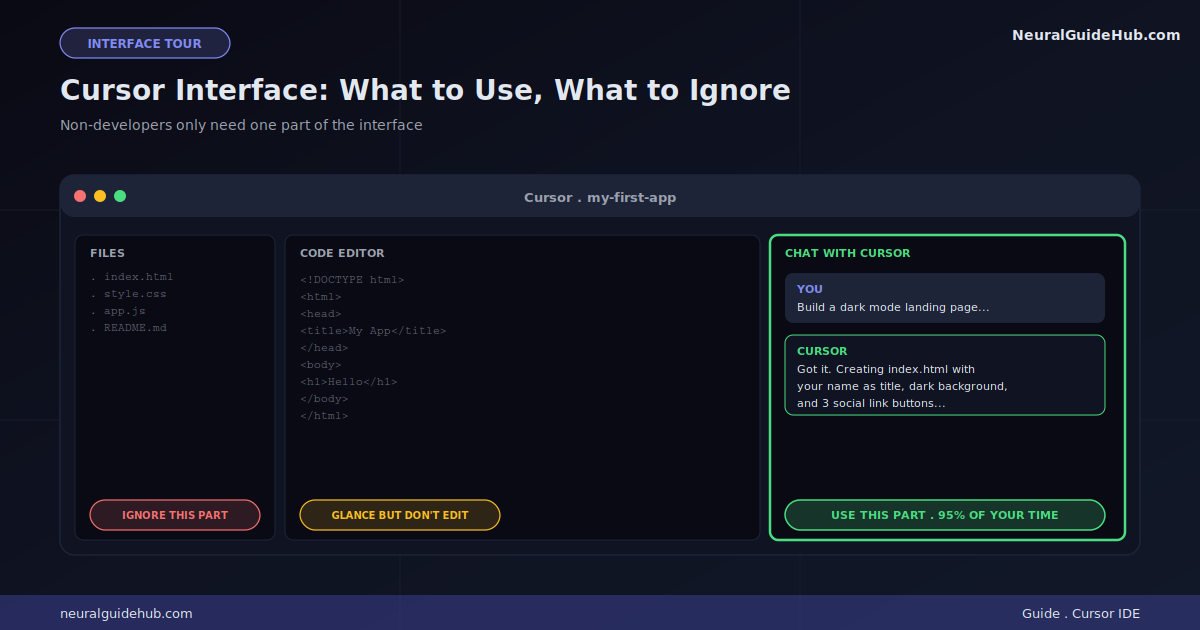
When Cursor opens, ignore most of the interface. Look for one thing: the chat panel on the right. That’s where you’ll spend 95% of your time. Everything else is for developers. Leave it alone.
Step 2: Create Your First Project Folder
Open File. Click “Open Folder.” Make a new folder on your Desktop. Call it something clear. “my-first-app.” Select it. Open in Cursor.
This is your workspace. Everything Cursor builds goes here. Break something badly? Delete the folder. Start fresh. No damage done.
Rule: one folder per project. Don’t mix things. One idea, one folder. Keeps your work clean.
Step 3: Write Your First Prompt
Open the chat panel. Click in the text box. Describe what you want.
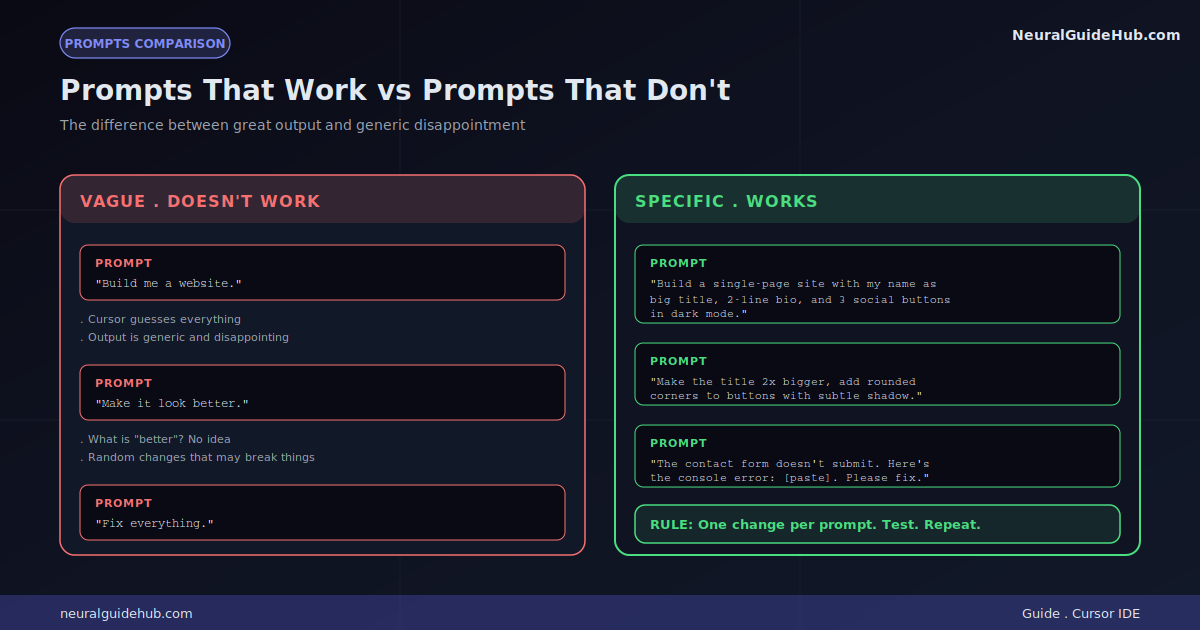
What works: describe a small, specific thing. Like this. “Build a single-page website with my name as a big title, a 2-line bio about being a freelance writer, and three buttons linking to my Twitter, LinkedIn, and email. Dark mode.”
What doesn’t: “Build me a website.” Way too vague. Cursor will guess. Output will be generic. You’ll be disappointed.
The rule: specificity wins. Always.
Send the prompt. Wait. Cursor writes code, creates files, shows you what it did. A preview shows up. Looks close to what you wanted? Great. Doesn’t? Iterate.
Step 4: Iterate Like a Designer
Non-developers do this better than developers. You’re not stuck thinking about code. You think about results.
Look at what Cursor built. Decide what’s wrong. Tell Cursor in plain language.
Examples that work:
- “Make the title bigger. Like 2x bigger.”
- “The buttons look ugly. Make them rounder. Add a subtle shadow.”
- “Change the background from black to dark navy.”
- “The page is too wide on phones. Make it look good on mobile.”
Each prompt fixes one thing. Don’t try to fix five problems at once. One change. Test. Move on. Next.
Step 5: Save and Preview Your Work
Cursor saves automatically most of the time. But preview matters more.
Find the file in your folder called “index.html” (or whatever Cursor named it). Double-click. Your browser opens it. That’s your live preview.
Refresh the browser after each Cursor change. Some people miss this step. Then they think nothing’s changing. Refresh fixes that.
Pro tip: keep your browser open next to Cursor. Make change. Refresh. See result. Loop fast.
The Three Rules That Prevent Disasters
Disasters happen when non-developers skip these three rules. Stick to them. Save yourself hours.
Rule 1: One change at a time. Change five things at once and something breaks? You won’t know which change caused the break. Make one change. Test. Repeat.
Rule 2: Save working versions. Every time something works, duplicate the folder. Name the copy “working-version-1.” Next changes break everything? You have a backup.
Rule 3: Give context when things break. Don’t just paste error messages. Describe what you were trying to do. Context helps Cursor fix things faster.
What to Do When Things Break
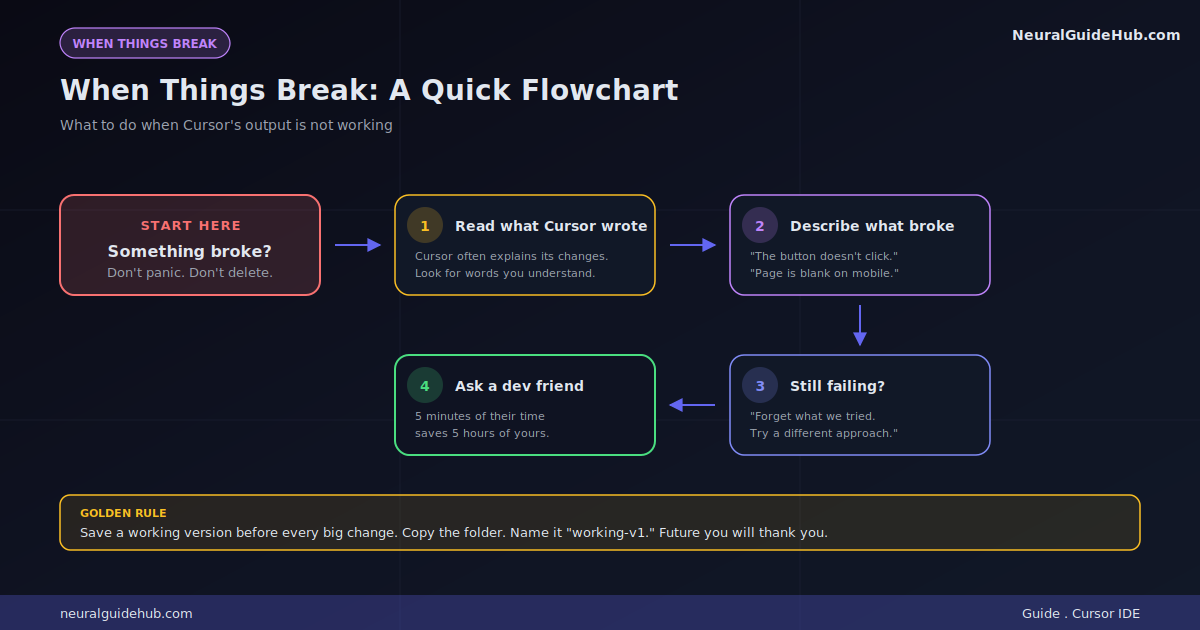
Stuff will break. Plan for it. Don’t panic.
First: read what Cursor wrote. Look for words you understand. Cursor often explains what it changed and why.
Second: tell Cursor exactly what happened. “I clicked the button and nothing happened. Console error: [paste]. Please fix.”
Third: if Cursor keeps failing on the same problem, restart fresh. Tell it: “Forget what we tried. Let’s solve this differently. The goal is: [describe goal]. Try another approach.”
Fourth: ask a developer friend. Five minutes of their time beats five hours of your frustration.
Real Projects You Can Build This Weekend
Skip the theory. Try these. They actually work for non-developers.
Personal landing page. One page. Your name. What you do. Three social links. Mobile-friendly. About 30 minutes.
Simple to-do list app. Add tasks. Check them off. Delete them. Stored in your browser. About an hour.
Email signature generator. Type your info. Get a styled email signature you can copy. 45 minutes.
Quote or invoice generator. Form on left. Live preview on right. Print to PDF. 2 hours.
Workout timer. Set work and rest periods. Beeps when intervals change. 1 hour.
Recipe converter. Paste a recipe. Convert measurements. Scale servings. 90 minutes.
Pick from this list first. Don’t go off-script until you know how Cursor responds. Emma started with the to-do list. Took her 90 minutes. Then she got brave.
How Far Can You Really Go
Honest answer: pretty far. Not infinitely far.
You can probably build:
- Static websites and landing pages
- Single-page utility apps (calculators, timers, generators)
- Simple databases stored in the browser
- Apps that connect to public APIs
- Browser extensions for personal use
You’ll struggle with:
- User accounts and authentication
- Payment systems (get a developer for security)
- Complex backend systems
- Apps scaling to thousands of users
- Anything dealing with sensitive data
Quick rule. Idea fits as “a page that does X”? Cursor probably handles it. Idea is “a platform that connects A to B with payments and accounts”? Get help.
Pro Tips That Actually Help
- Describe what users see. “When I click the button, a popup shows X” beats “Add a function that triggers a modal.”
- Give context every time. Cursor forgets between sessions. Remind it: “This is my freelance writer landing page.”
- Ask Cursor to explain itself. “Walk me through what you just changed in plain English.” Cursor will. You’ll learn while building.
- Use real reference sites. “Make the layout similar to stripe.com but for my coaching service.” Cursor handles this well.
- Save your best prompts. Something works? Copy it into a notes file. Reuse the structure later.
- Don’t trust the first version. Iterate 3-5 times before accepting anything as done. Version 5 is usually way better than version 1.
Mistakes That Kill Non-Developer Projects
- Starting too ambitious. Building “the next Instagram” on day one. Build a photo viewer first. Add features later.
- Skipping the preview step. Writing prompts without checking what Cursor built. You’ll find out things broke weeks later.
- Not saving working versions. Then accidentally breaking things. Then starting over.
- Asking instead of instructing. “What should I do?” gives weak responses. “Add a search bar at the top” gives strong responses.
- Giving up after the first broken build. Everyone hits walls. Winners try one more prompt instead of quitting.
- Treating it like a real software project. You’re not building production software. You’re prototyping. Keep that mindset.
Your First Weekend Plan
Realistic plan if you start tomorrow:
- Saturday morning: Install Cursor. Build your personal landing page. 2 hours.
- Saturday afternoon: Add a to-do list to a new folder. Save the working version. 2 hours.
- Sunday morning: Pick one project from the list above. Finish before lunch.
- Sunday afternoon: Show what you built to someone. Get feedback. Iterate.
By Sunday night you’ll have built three things. You’ll know what works for you. You’ll know what doesn’t. Enough information to decide if this path makes sense.
The Real Talk
I won’t pretend Cursor makes you a developer. It doesn’t. You’re not learning to code. You’re learning to direct code. Different skill. Both valuable.
Here’s the thing nobody mentions about how to use Cursor for non-developers. It teaches you to think clearly about software. After a month with it? Way better at scoping ideas. Sharper at describing what you actually want. Faster at spotting when a project is too big.
Those skills matter even if you never code professionally. Better idea-shaping. Sharper requirements. Faster iteration. Real career value.
Stop reading. Open Cursor. Build the personal landing page first. Show it to someone you trust by Sunday night. Decide from there if you want to keep going.
The window for this is wide open. Tools are good now. They’ll get better. Get familiar with directing AI to build things. That skill compounds. Emma figured it out. So can you. Start today.