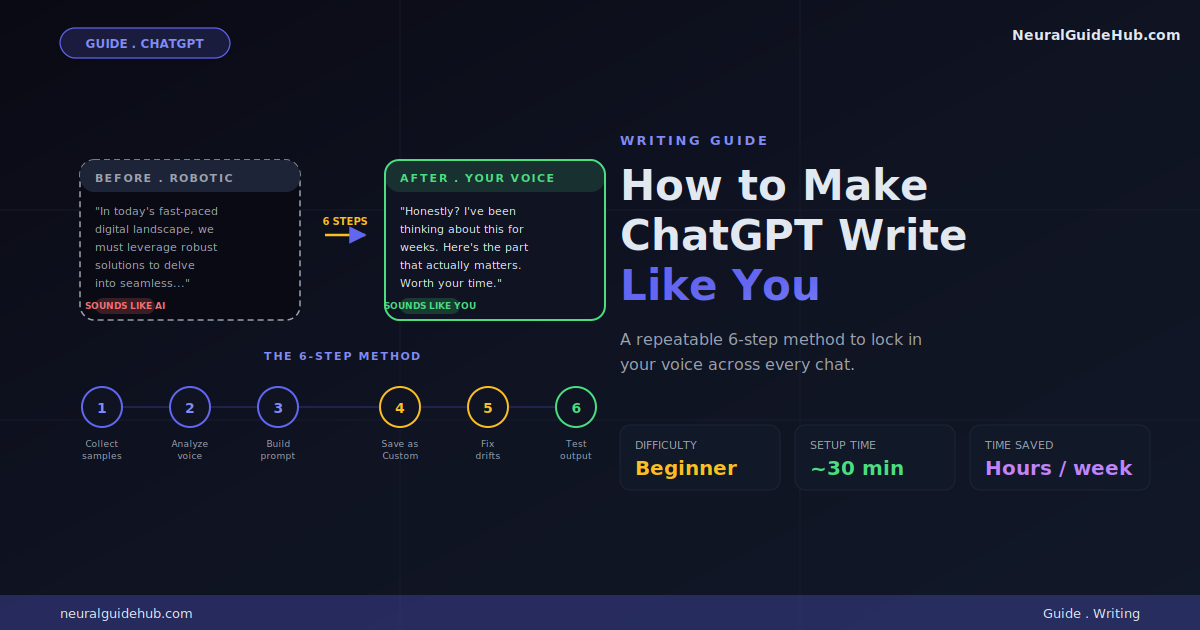
Six months ago I gave up. Tried for months to get ChatGPT to write the way I write. Every output came back sounding like a press release in a hurry. Friendly enough. Just… not me. Then I figured out the actual process. Took maybe a weekend to crack. Now ChatGPT writes my newsletter intros, my client emails, even some of my essay drafts. The trick to make ChatGPT write like you isn’t one prompt. It’s a setup. Once it’s done, you stop fighting the default voice forever.
I’m not selling anything here. Just walking you through what worked. Newsletters. Articles. Emails I would’ve put off for three days. The method below is what actually stuck after dozens of failed attempts. Not “10 mind-blowing prompts.” Real, repeatable. Maybe 30 minutes of setup.
What You’ll Learn
- Why ChatGPT’s default voice sounds like a robot wearing a tie
- How to extract your real writing fingerprint in about 10 minutes
- The exact prompt structure that actually locks in your voice
- How to save it so you don’t paste the same thing every time
- The three drifts that wreck good prompts (and how to fix each)
- How to test if the output really sounds like you
What You Need
A ChatGPT account. Free works. Plus is fine too. Five samples of your real writing. Maybe 30 minutes once. Then hours saved every week after.
That’s it. No paid tools. No Chrome extension that “transforms” anything.
Why ChatGPT Sounds Robotic by Default
Quick context. ChatGPT was trained to be helpful, polite, clear. Good defaults for most people. But “helpful, polite, clear” averaged across millions of training examples produces a very specific voice. Smooth. Generic. Slightly over-explaining everything. Heavy on words like “additionally” and “furthermore.”
Your voice probably isn’t any of those things. Real human writing has rhythm. Fragments. Strange turns of phrase you wouldn’t think of consciously. ChatGPT won’t reproduce these. Not unless you tell it to. Specifically.
The mistake almost everyone makes? They type “write in my style” and expect ChatGPT to figure the rest out. It can’t. You have to show it your voice and describe it. Both steps. Skip either one and you get generic output.
Step 1: Collect Your Writing Samples
Pull together 5 to 10 things you’ve actually written. The more variety, the better. Examples:
- Two recent emails. Real ones. Not the ones you spent 20 minutes editing.
- Some social posts or LinkedIn updates
- Blog posts, newsletters, or articles you’ve published
- A long Slack message where you actually explained something
- A text thread where you sounded like you
The trick: pick samples where you sound like you. Skip anything overly formal. Skip anything ghostwritten. Skip the LinkedIn posts where you tried to sound smart. Authentic beats polished. Every single time.
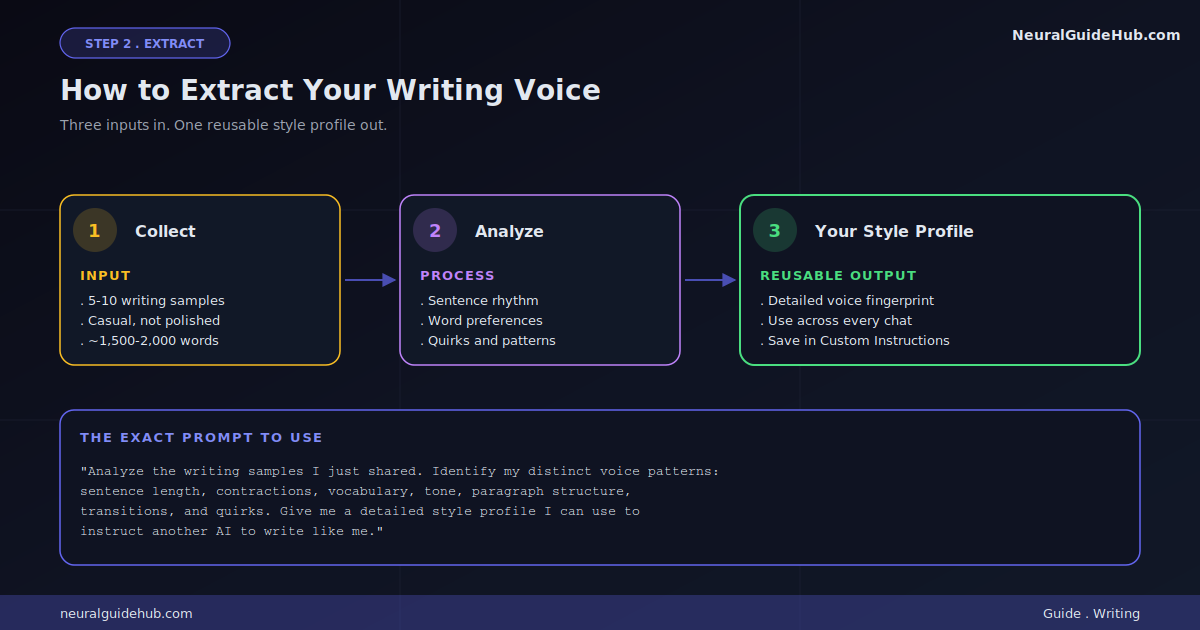
Drop them in one text doc. Aim for 1,500 to 2,000 words total. That’s roughly the threshold ChatGPT needs before it can actually pick up your patterns.
Step 2: Have ChatGPT Analyze Your Voice
Open a new chat. Paste your samples. Then send this prompt:
Analyze the writing samples I just shared. Identify my distinct voice patterns: typical sentence length, contractions, vocabulary, tone, paragraph structure, transitions, and any quirks or repeated phrases. Give me a detailed style profile I can use to instruct another AI to write like me.
What comes back is gold. Genuinely. ChatGPT will spot things about your writing you don’t see yourself. Maybe you use one-sentence paragraphs for emphasis. Maybe you start sentences with “And.” Maybe you have a thing for parentheticals (like this one). All of that becomes the foundation for getting it to write like you.
Save that style profile. You’ll use it in every prompt going forward.
Step 3: Build the Master Style Prompt
Now you turn that analysis into something reusable. Here’s the template:
You write in my voice. Here is my style profile: [paste analysis from Step 2]. Here are 3 examples of my actual writing: [paste 3 samples]. Rules: 1) Match my sentence rhythm, including fragments. 2) Use contractions naturally. 3) Avoid generic AI phrases like "in conclusion," "furthermore," "delve into." 4) Keep paragraphs short, 2-3 sentences. 5) Include the small quirks I use, like [list 2-3 specific quirks]. Now write [your actual request].
This prompt does three things at once. Shows your patterns. Describes them in words. Bans the AI tells that always sneak back in. All three layers together is what makes the difference.
Step 4: Save It as Custom Instructions
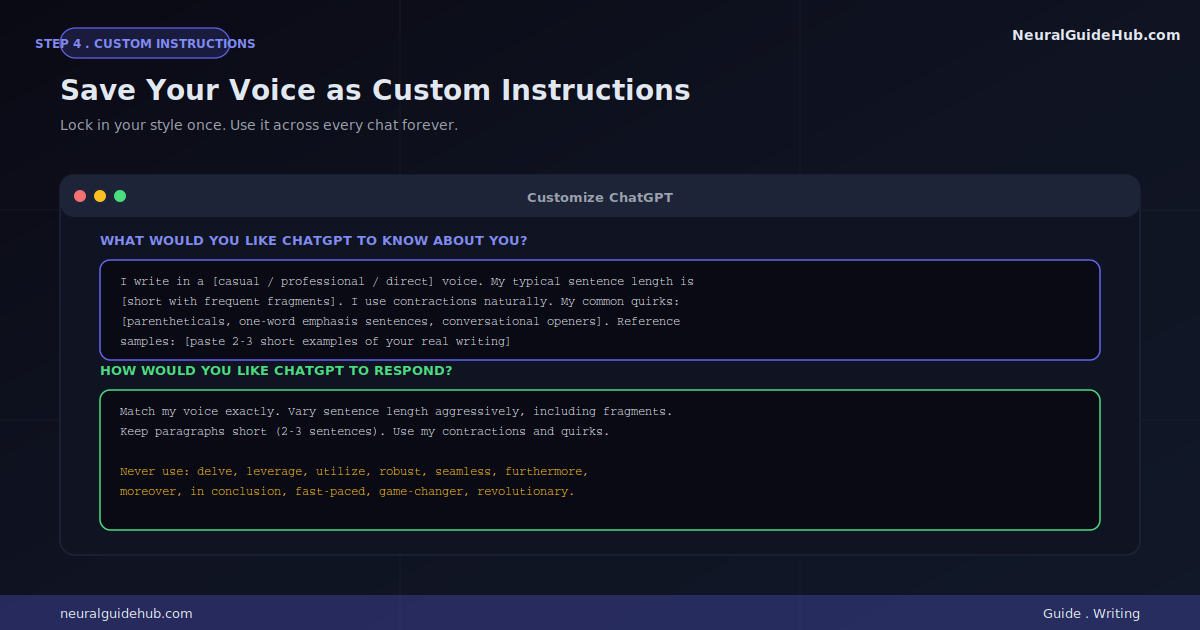
Pasting that long prompt every single time? Annoying. Custom Instructions fixes that. ChatGPT remembers it across every chat.
Setup steps:
- Click your profile icon
- Go to “Customize ChatGPT” or “Personalization”
- In the “What would you like ChatGPT to know about you” box, paste a condensed version of your style profile
- In the “How would you like ChatGPT to respond” box, paste your style rules plus the phrases to avoid
- Save
Now every chat starts with your voice baked in. You only add the actual writing task. Not the whole “this is how I write” preamble.
Step 5: Fix the Three Things ChatGPT Still Gets Wrong
Even with a solid setup, ChatGPT drifts. Here are the three usual problems and how I fix each one.
Drift 1: It gets too formal
You ask for a casual email. You get a press release. Fix: add the line “Match the casual tone of my reference samples. Read the samples again before responding.” Forcing a re-read mid-conversation pulls it back. Sounds simple. Works.
Drift 2: It uses banned phrases anyway
You told it no “delve into.” There it is in paragraph two. Fix: be specific. Instead of “avoid AI phrases,” say “Never use these words: delve, leverage, utilize, robust, seamless, furthermore, moreover, in conclusion, fast-paced.” Specific bans beat general ones every time.
Drift 3: The rhythm goes flat
Real writing mixes long and short sentences. ChatGPT defaults to medium-length sentences. Over and over. Fix: add the rule “Vary sentence length aggressively. Mix one-word sentences with long ones. Break paragraphs after a single sentence when it earns the emphasis.”
That last bit matters. ChatGPT needs explicit permission to break grammar rules the way you naturally do.
Step 6: Test the Output Like a Skeptic
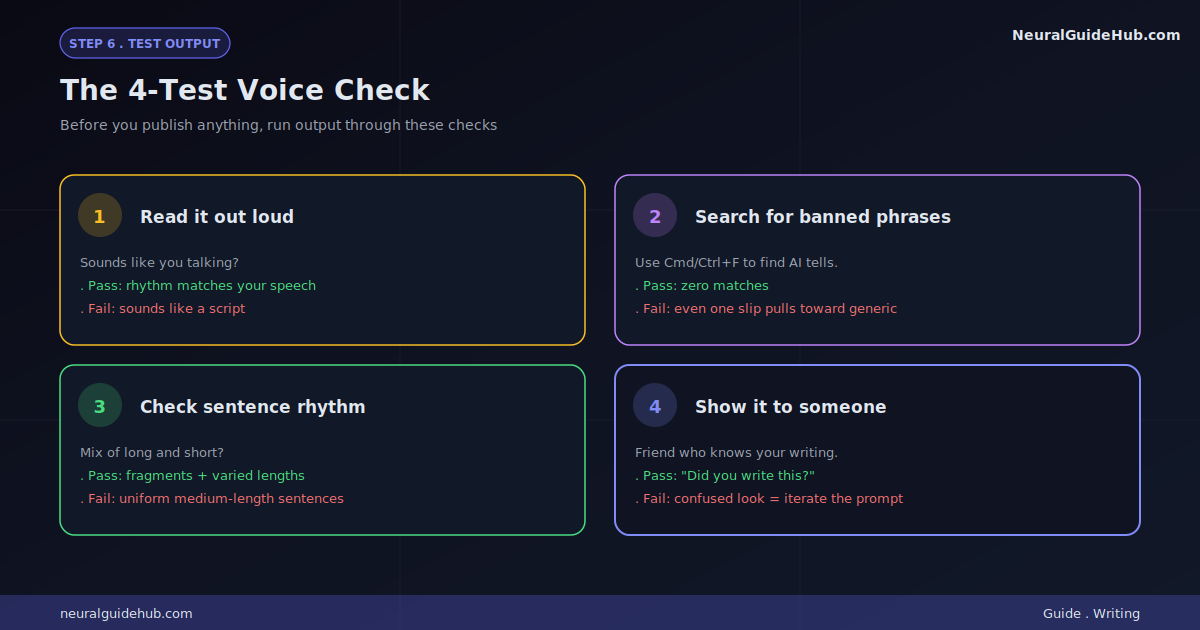
Before you use anything ChatGPT wrote, run this quick test:
- Read it out loud. Sounds like you talking? Good. Sounds like a stranger reading from a script? The voice didn’t land.
- Search for banned phrases. Cmd+F. “Delve.” “Leverage.” All the AI tells. Even one slip pulls the piece back to generic.
- Check sentence rhythm. Fragments? Mixed lengths? If everything’s the same length, the rhythm is wrong.
- Show it to someone who knows your writing. If they can’t tell it’s AI, you nailed it. If they look confused, your prompt needs work.
That fourth test is the most important. Other people are way better at spotting “this isn’t you” than you are. Your brain reads what it expects. They read what’s actually there.
Pro Tips That Actually Move the Needle
- Update your samples quarterly. Your voice evolves. Refresh every few months so ChatGPT stays current with how you write today, not how you wrote a year ago.
- Use different setups for different contexts. Your email voice isn’t your blog voice. Set up two Custom Instructions profiles. Casual for one, professional for the other. Switch when needed.
- Feed it your unfinished drafts. Don’t start from scratch. Paste your rough draft. Say “rewrite this in my voice without changing the meaning.” Editing your existing voice is way easier than generating it cold.
- Add “stylistic anchors.” Pick 3-5 specific phrases or sentence structures you use a lot. Tell ChatGPT to include at least one in every response. Forces your fingerprint into the output.
- Use the “what you would never say” trick. List 5 phrases you’d never naturally write. ChatGPT will avoid them. Often more effective than telling it what to do.
- Try Claude as a second opinion. If ChatGPT is stuck on its default voice, paste the same prompt into Claude. Different model. Different defaults. Sometimes Claude lands closer to your voice on the first try.
Common Mistakes to Avoid
- Just saying “write in my style.” ChatGPT can’t read your mind. No samples, no style profile, no chance. Generic output every time.
- Using formal samples. Feed it polished writing? You get polished writing back. Your real voice lives in your casual writing. Use that.
- Editing the output too heavily. If you’re rewriting half of what ChatGPT produces, your prompt isn’t working. Fix the prompt. Don’t fix the output.
- Forgetting to update your profile. A six-month-old style profile is no longer your voice. Refresh it.
- Trusting the first output. ChatGPT gets closer with each iteration. Don’t settle for draft one. Push back. “Still too formal. More like my samples.” Then again. Then again.
Next Steps
If you actually do everything in this guide, here’s what your first week looks like:
- Day 1: Collect samples. Run the analysis. Save your style profile.
- Day 2: Set up Custom Instructions.
- Day 3: Test on a real writing task. Email. Post. Anything.
- Day 4: Show output to someone. Iterate based on their reaction.
- Day 5: Add stylistic anchors and bans based on what drifted.
- Day 6 onward: You’re saving hours a week. Use them on better stuff.
The thing nobody tells you about trying to make ChatGPT write like you? Once you crack it, you start thinking more clearly about your own voice. You notice patterns you never saw. You become a better writer just from doing the analysis. The AI is the second-biggest benefit. The first is finally understanding how you actually write.
And if you land a setup that really works, save that style profile somewhere safe. That document is genuinely valuable. It’s a fingerprint of your voice you can use across any AI tool. Now and later.