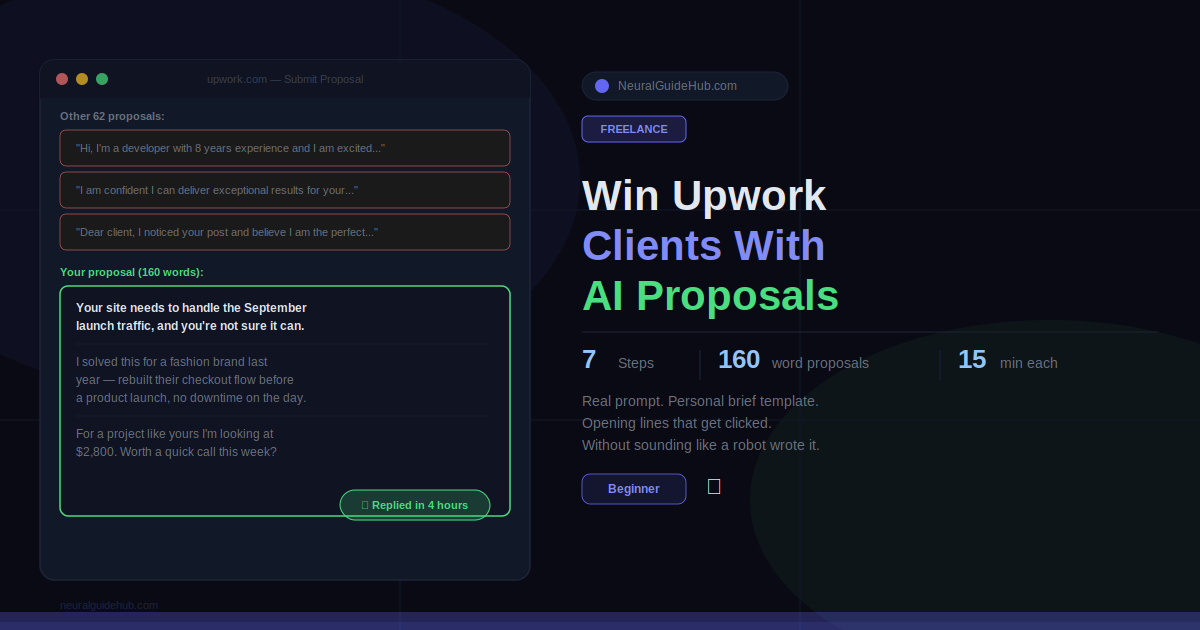
A client I know posts web design jobs on Upwork occasionally. I asked her once how she picks who to hire. She said she reads maybe the first ten proposals, skims the next ten, and ignores everything after that. The job she posted that day had 63 applications.
Fifty-three of those people wasted their connects.
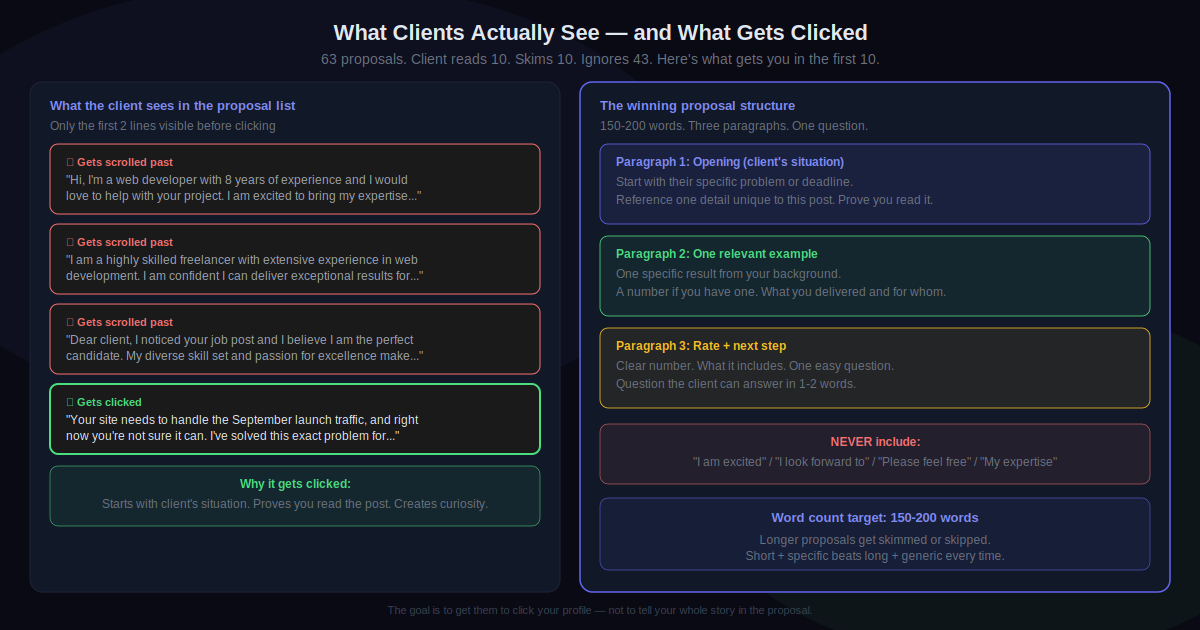
She also told me something I didn’t expect. The proposals she ends up hiring from are almost always short. Under 200 words. They open with something specific to her job post, not a sentence about the freelancer. And they ask one clear question at the end instead of saying “I look forward to hearing from you.”
That’s it. That’s the whole formula. And yet the vast majority of AI Upwork proposals people are sending right now do the exact opposite. They’re long, they start with “I”, and they end with phrases so generic they’ve become invisible.
This guide is about fixing that. How to use AI to write proposals that actually sound like a person read the job post, thought about it, and responded specifically to it.
What You’ll Learn
- Why most AI Upwork proposals get skipped immediately and what changes that
- A one-time personal brief that makes every prompt produce something specific to you
- The exact prompt to paste into ChatGPT or Claude that generates a usable first draft
- How to write an opening line that gets clients to click instead of scroll
- A two-minute editing process that removes everything AI gets wrong
- How to build a template after you’ve found what works for your niche
What You Need
- An Upwork profile with a complete headline and at least one portfolio item. Proposals from blank profiles don’t get opened. This is the floor requirement before anything else matters.
- ChatGPT or Claude. Free is fine. Claude writes more conversational output. For proposals specifically, that matters.
- A personal brief you write once. Two paragraphs. Your best result, your process, two specific examples. This is the only thing that makes AI output sound like you instead of a template. More on this in Step 2.
- Roughly 15 minutes per proposal. Five for research. Five for the draft. Five for editing. The editing is where the proposal becomes something worth sending.
Before we get into the steps, something worth saying plainly. Upwork clients have read thousands of AI proposals. They know the pattern. Smooth. Formal. Weirdly enthusiastic. Completely generic. “I am excited to bring my expertise to your project.” If your proposal has sentences like that in it, it gets ignored. The process here creates a first draft. You edit it. That edit is not optional. Without it, you’re just adding to the pile of 53 proposals nobody read.
Step 1: Read the Job Post Twice and Note Three Things
Five minutes. No shortcuts here.
Read the post once to understand it. Read it again to find these three things:
The actual problem, not the job title. “Looking for a copywriter” is a category. “We’re relaunching in September and our current product descriptions aren’t converting” is a problem. The problem is almost always buried in the second or third paragraph. Find it and write it down in one sentence.
One detail unique to this post. A word they used. A deadline they mentioned. A concern they raised. Something that only exists in this job post and not in the 40 other similar ones you’ve seen this week. This goes in your proposal and it’s the signal that you actually read it.
What winning looks like for them. Not a deliverable. An outcome. Faster site. More leads. A script finished before their product launch. What does success actually mean for this client in this situation? Write that down too.
These three things go directly into the prompt in Step 3. Without them, the prompt produces generic output. With them, it produces something that sounds like it was written for this specific job.
Step 2: Write Your Personal Brief
Do this once. Takes 15 minutes. Update it when you get better results or new examples.
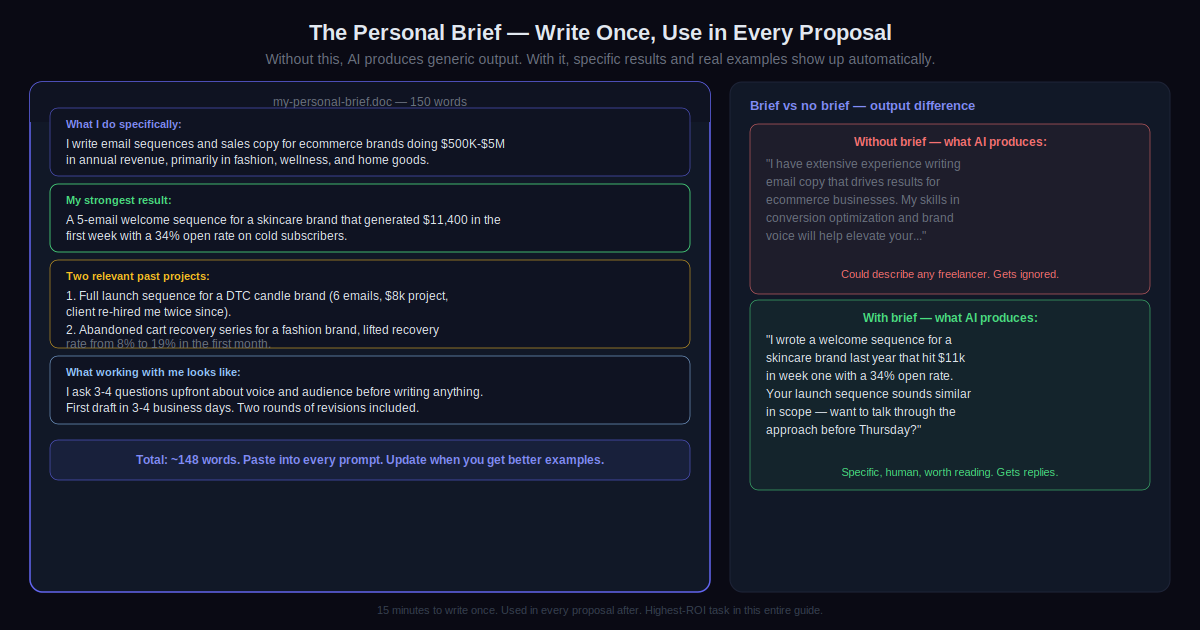
Open a blank document. Write plain sentences answering these:
- What do you do specifically? Not “I’m a designer.” What kind, for whom, delivered how?
- Your strongest result. One outcome with a real number. “Email sequence that brought in $11k the first week” beats “I write high-converting emails” every time.
- Two or three past projects most relevant to jobs you’re targeting. One sentence each.
- What working with you looks like. Two sentences max.
Keep it to about 150 words. Short enough to paste into a prompt. Long enough to give the AI something real to work from.
Without this, AI pulls from generic freelancer descriptions because it has nothing else. With it, specific results and real examples show up in the output. That’s the difference between “I have experience improving conversion rates” and “I redesigned a checkout flow that cut cart abandonment by 22% for a fashion brand.”
Step 3: Run the Prompt to Get Your Draft
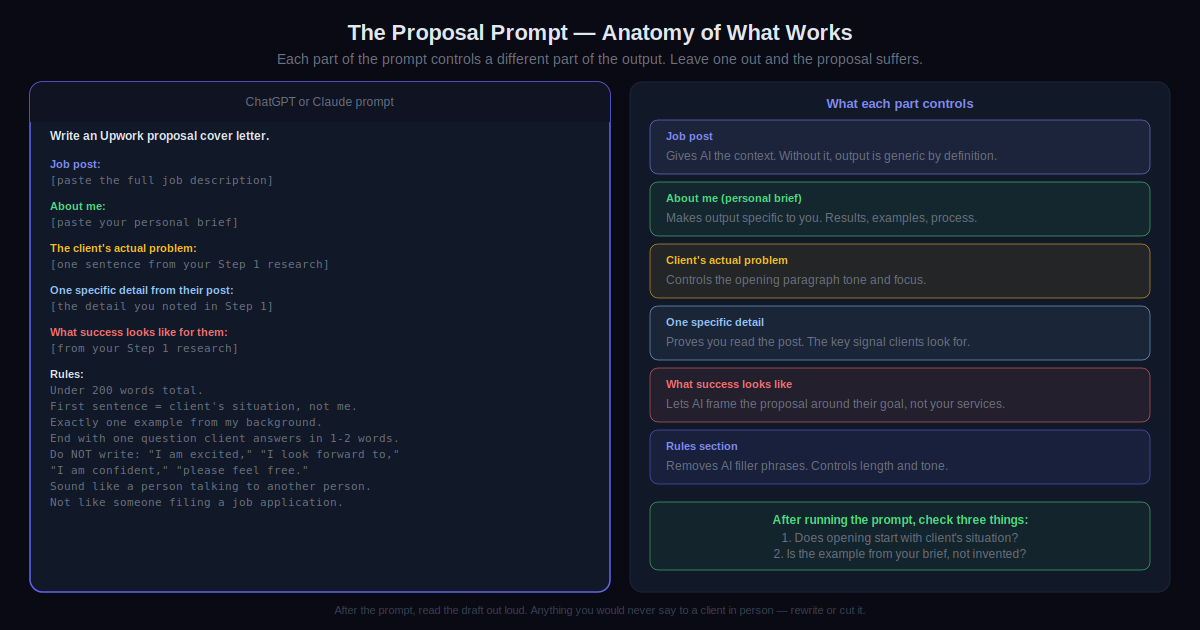
Open ChatGPT or Claude. Copy and paste this with your details filled in:
Write an Upwork proposal cover letter. Job post: [paste the full job description]. About me: [paste your personal brief]. The client's actual problem: [one sentence from Step 1]. One specific detail from their post I want to reference: [from Step 1]. What success looks like for them: [from Step 1]. Rules: Under 200 words total. The first sentence must be about the client's situation, not about me. Include exactly one example from my background. End with one simple question the client can answer in one or two words. Do not write "I am excited," "I look forward to," "I am confident," or "please feel free to." Write like a person talking to another person, not like someone submitting a job application.
Read what comes back. Check three things before moving on. Does the opening start with the client’s situation and not with you? Is the example actually from your brief and not invented? Does the ending question sound like something a real person would ask? Fix any that aren’t right before the next step.
Step 4: Fix the Opening Line
Upwork shows clients two lines of your proposal before they click to read more. Two lines. That’s the entire audition.
The opening has one job: make the client feel like someone understood their situation.
Compare these two openers for the same job:
“Hi, I’m a web developer with 9 years of experience and I’d love to help with your project.”
“Your site needs to handle the September launch traffic, and right now you’re not sure it can.”
The first one is about the freelancer. The second is about the client’s actual situation. The client reading the second one thinks: yes, exactly, does this person know what they’re doing? And clicks to find out.
If the AI produced a generic opener, ask it: Write three different opening lines for this proposal. Each should start with the client's situation, not with me. Reference something specific from their post. Under 20 words each. No "I" at the start. Pick whichever sounds most human.
Step 5: Edit Out Loud Before Sending
Read the whole thing out loud. Every word.
Anything you’d never say in a real conversation with a client, cut it. Anything that makes you pause because it sounds formal or hollow, rewrite it in simpler words. This catches the remaining AI texture in about two minutes.
Delete these on sight if they survived: “I am confident I can deliver exceptional results.” “Please feel free to reach out.” “I am passionate about helping businesses.” “My diverse skill set.” These are proposal filler. They carry no information. They show up in a huge percentage of proposals. Clients have learned to not even read them.
Replace them with nothing, or with one more specific detail about the project. Shorter is almost always better. Your proposal’s job is to get them to click your profile. Not to tell them your whole story.
Step 6: State Your Rate
“My rates are competitive and flexible.” That sentence does actual damage to your proposal. It makes the client do work before they’ve decided they want to talk to you.
Give a number. One sentence. What it includes.
“Based on what you’ve described, I’m looking at $X. That covers [what you’re delivering] with [number] rounds of revisions.”
If you need more information before committing to a final number, say exactly what and give a range: “I want to confirm the page count before locking in a number, but I’m estimating $X to $Y based on the scope you’ve outlined.” Specific is fine. Vague is not.
Step 7: Track Results, Then Build a Template
Send 10 proposals using this process. Track all of them in a simple spreadsheet. Job type, proposal length, opening style, rate, reply yes or no, hired yes or no.
After 10, look at the data. Which ones got replies? What did those openings have in common? Which rates got responses? You can ask AI to help spot patterns: Here are three proposals that got replies: [paste them]. What do they share? What phrases or structures appear in more than one?
Use what you find to build a niche template. Not a copy-paste proposal. A starting skeleton with your strongest example already in it, your rate formula, and a flexible first paragraph where you drop in the job-specific opening each time. The template handles the structure. You still do the five-minute research and the read-aloud edit every single time.
Pro Tips
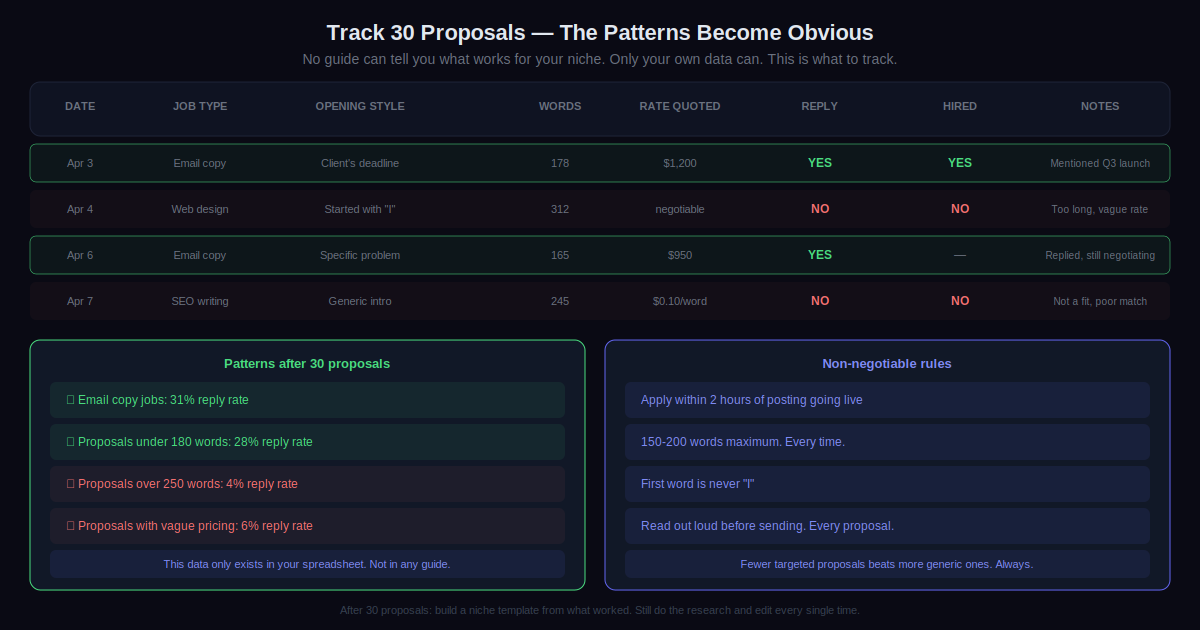
- Apply within two hours of a post going live. Most clients review the first 15 to 20 proposals they get and then mostly stop. Being in that first batch matters. Set up Upwork job alerts for your main keywords and check them at least twice a day.
- Stay under 200 words. Long proposals look like work to read. If your draft is over 200 words, cut the last paragraph. Whatever you deleted probably wasn’t doing much anyway. Three short paragraphs, a rate, a question. That format wins more often than longer ones.
- Mirror their language. If the post says “we need someone who moves fast,” use that phrase. If they describe themselves as a “small but scrappy team,” mirror that energy in your tone. Clients notice when a proposal sounds like it was written for theirs specifically. That recognition is what makes them click.
- Ask Claude to review before you send. Paste your final draft and the original job post into Claude and ask: “Does this feel written for this job specifically, or could it be sent to any job? Flag anything that sounds like a template.” It catches things you miss on the read-through.
- Fewer proposals, better ones. When reply rates are low the instinct is to send more. Usually the right move is fewer, targeted at jobs where you’re a genuine fit. A 25% reply rate on 10 proposals beats 3% on 50, and you spend fewer connects.
- Track everything for 30 proposals. Which job types reply. Which openings get clicked. Which rate ranges work. No guide can tell you this for your niche. Only your own data can. Thirty proposals gives you enough to see patterns clearly.
Common Mistakes to Avoid
- Sending the AI draft without reading it out loud. The most expensive mistake. Clients can identify unedited AI proposals in seconds. The smooth, confident, slightly hollow tone is a pattern they’ve seen hundreds of times. Two minutes of reading out loud catches almost all of it. Skipping it means your connects went to a proposal that was archived before it was finished loading.
- Starting with “I.” First word of the proposal. Should not be “I.” Not “I have experience.” Not “I noticed your post.” Not “I would love to help.” The opening is about the client’s situation. One change, noticeable difference in how many people click to read the rest.
- Applying to jobs where you’re not a real fit. Clients notice fast. A proposal for a React developer job that mentions your background is mostly in WordPress gets deleted immediately. Apply only to jobs where your actual experience maps to what they’re asking for. Quick check before applying: could you show up to a 20-minute call about this and answer specific questions? If no, save the connects.
- Vague pricing. “Competitive rates” means nothing and makes the client do extra work before deciding if they want to talk to you. Give a number. If you need more information first, say what and give a range. Clients have limited time. Make the decision easy for them.
- Skipping the personal brief. Without it, AI generates generic freelancer language because it has nothing specific to draw from. Writing the brief takes 15 minutes. It gets used in every proposal after that. It’s the single highest-ROI task in this entire guide.
Next Steps
Write the personal brief. Right now, before anything else. 15 minutes, 150 words. That document is the foundation that makes every other step in this guide produce something specific instead of generic.
After that, find one job on Upwork that genuinely matches your skills. Do the five-minute research. Run the prompt. Edit it out loud. Send it.
One. Not ten. One, done properly, tells you more than ten done quickly.
After 10 proposals, look at your data. After 20, you’ll see patterns. After 30, you’ll have what you need to build the template from Step 7 and stop figuring out the structure every time.
The client I mentioned at the start, the one who gets 63 proposals and reads 10? She hired a freelancer last month who sent a 160-word proposal that opened with a sentence directly about her launch deadline. She replied within four hours. The other 62 people are still wondering why they don’t get replies.