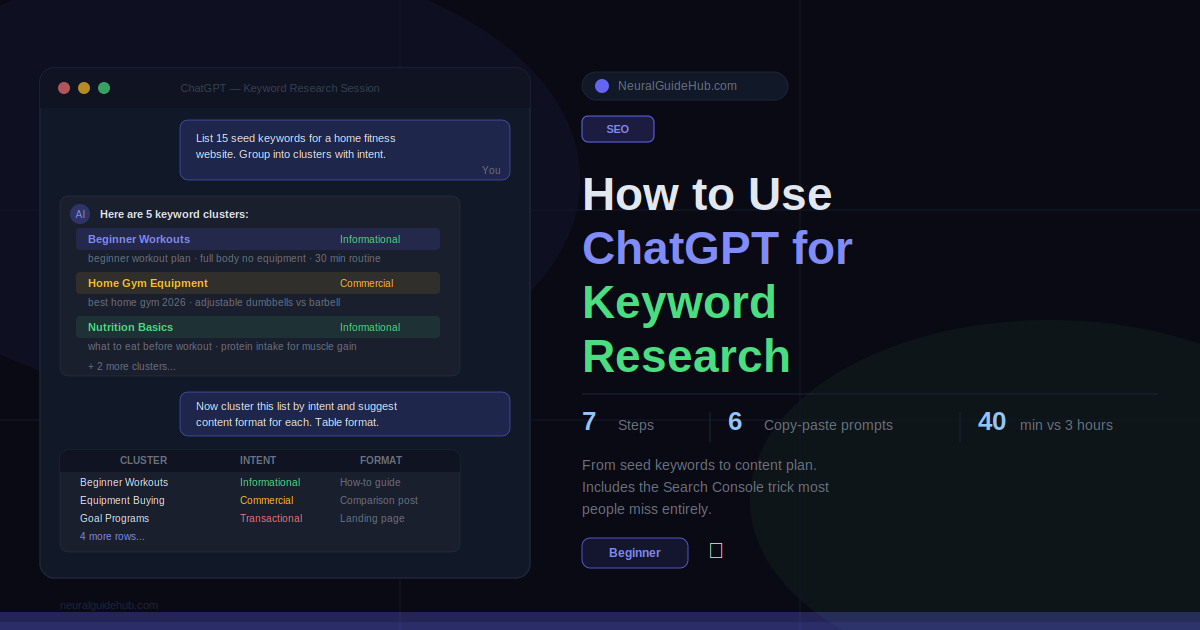
Okay so here’s something embarrassing. I used to spend entire mornings on keyword research. Four, five hours. Spreadsheets everywhere. Color-coded by intent. Tabs open in Ahrefs, Semrush, Google Trends, and three different browser windows with competitor sites. And at the end of it I’d have a list of maybe 40 keywords I felt okay about.
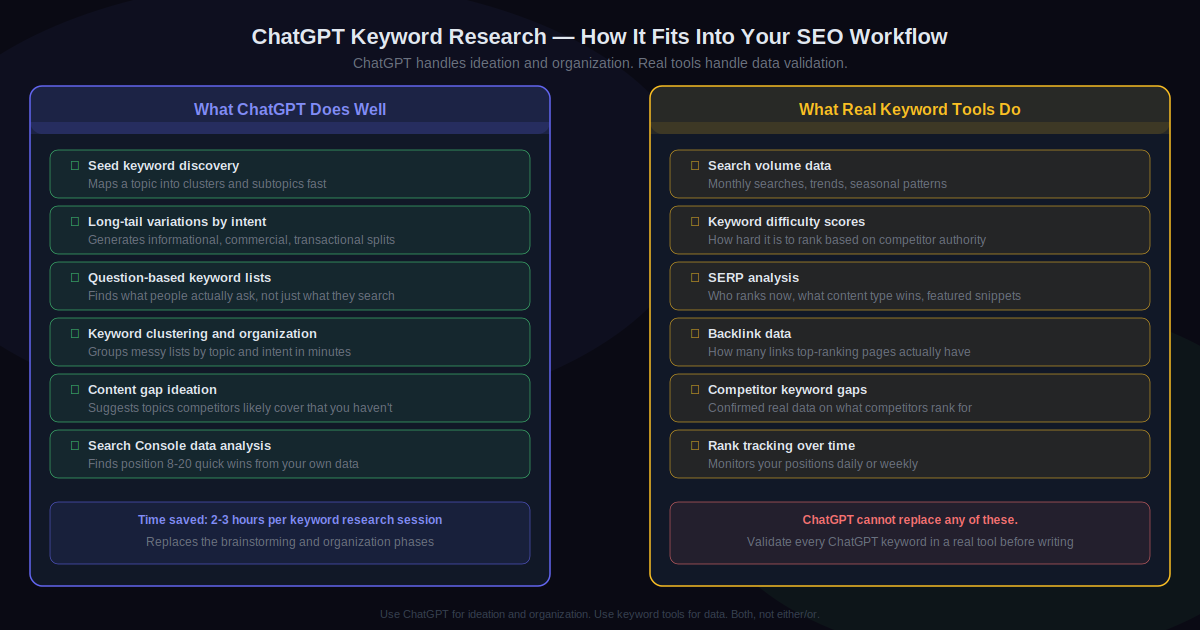
My colleague watched me do this once and said “you know you could use ChatGPT for the brainstorming part, right?” I’d heard that before and dismissed it. ChatGPT doesn’t have search volume data. It can’t tell you difficulty scores. I knew all that.
But the brainstorming part. That’s different.
I tried it. First session I ran ChatGPT keyword research properly, I had a structured list of 80 keyword ideas in about 35 minutes. Organized by intent. With question variations. With a content gap analysis I’d have spent two hours doing manually. Not all of them were good. Some were invented. But as a starting framework, it was genuinely faster than anything I’d done before.
This guide covers exactly how I do it now. Real prompts, honest limitations, and where traditional tools still need to come in.
What You’ll Learn
- What ChatGPT keyword research is actually good at and what it genuinely cannot do
- How to build a seed keyword map from a single broad topic in under 10 minutes
- A prompt that generates long-tail keywords sorted by intent automatically
- How to turn a messy 100-keyword list into a clean content plan using one prompt
- The Search Console trick almost nobody uses that finds your quickest traffic wins
- Mistakes that waste your time and produce keywords nobody is searching for
What You Need
- ChatGPT. Free account is fine. You don’t need Plus for any of this.
- A niche or topic. Broad is okay at the start. “Home fitness,” “freelance design,” “vegan cooking.” You’ll narrow it down.
- Google Search Console. Free. Takes five minutes to connect if you haven’t. Needed for Step 6 only, but that step is worth doing.
- One keyword validation tool. Ahrefs, Semrush, or free Ubersuggest. ChatGPT suggests. The tool confirms. You need both.
Before anything else, I want to say this clearly because people get burned by it: ChatGPT has no search volume data. None. It will sometimes invent keywords that sound completely real but have zero searches. Every single keyword you generate with ChatGPT needs to be checked in a real tool before you write content around it. This is not optional. It’s the one rule that matters more than anything else in this guide.
Step 1: Map Your Topic into Seed Keywords
Start broad. A seed keyword is just the main topic, one or two words. Before you can find long-tail variations or content angles, you need a map of what the territory looks like.
This prompt works well:
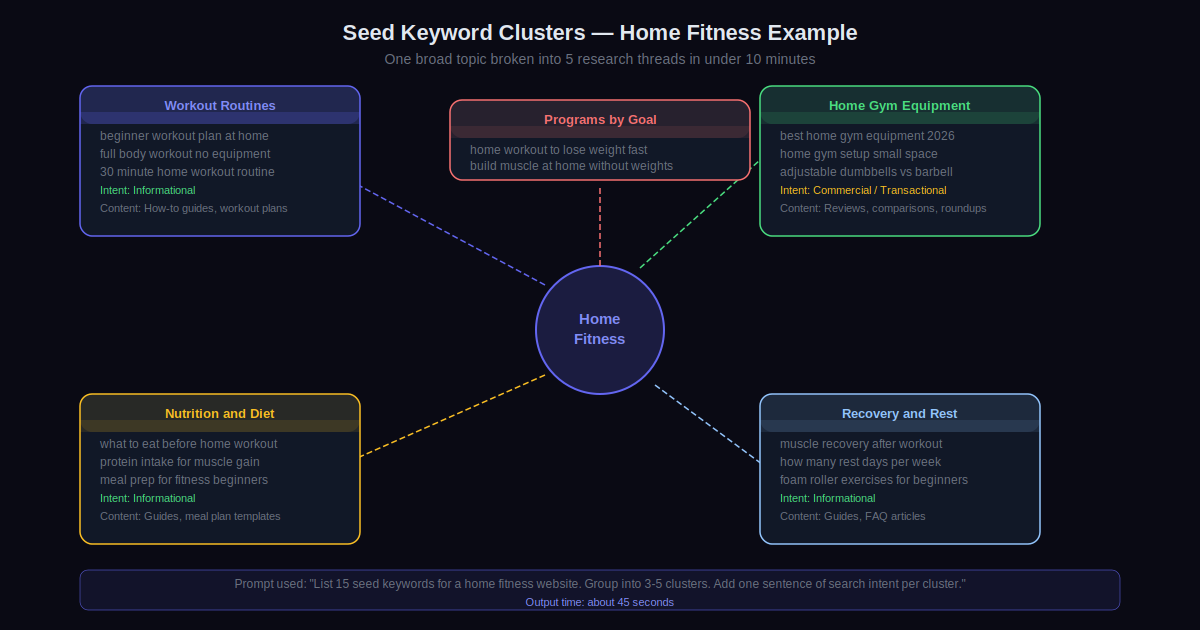
I'm building an SEO content strategy for a website about [your topic]. List 15 seed keywords covering the main categories and subtopics someone would search in this niche. Group them into 3 to 5 thematic clusters. For each cluster, write one sentence describing the typical search intent.
What comes back is a map, not a finished list. For a home fitness site you’d get clusters like “beginner workout routines,” “home gym equipment,” “nutrition basics,” “recovery and rest,” and “workout programs by goal.” Each one becomes its own research thread in the steps that follow.
The intent descriptions matter more than they look. “Someone searching ‘beginner workout routines’ wants to start exercising but doesn’t know where to begin and feels overwhelmed by options” is genuinely useful framing for writing content later. Note it down.
Step 2: Go Deep on Long-Tail Keywords for Each Cluster
Long-tail is where most sites actually build traffic. Especially new ones. Less competition, more specific intent, easier to rank. Pick one cluster from Step 1 and use this:
Give me 20 long-tail keyword variations for "[cluster topic]." Include keywords for beginners just learning the topic AND keywords for people ready to take action or buy. Label each one: informational, commercial, or transactional. Keep each keyword under 7 words. Do not invent keywords that nobody would realistically search.
The last sentence is important. Without it, ChatGPT occasionally produces things like “optimal home workout synergy protocol.” Sounds plausible. Zero searches. Adding “do not invent keywords nobody would realistically search” reduces this problem significantly, though it doesn’t eliminate it entirely. You still need to validate.
Do one cluster at a time. Not five at once. One cluster per prompt gives you focused, useful output. Asking for everything together gives you a shallow list that covers nothing well.
Take the output, paste it into Ahrefs or Ubersuggest, throw out anything with no volume, keep the ones that have real searches and competition your site can realistically compete with. That filtered list is your actual working keyword set for that cluster.
Step 3: Pull Out Question-Based Keywords
Questions rank in People Also Ask. They show up in featured snippets. They match how people actually type, especially on mobile and voice search. And they’re often easier to rank for than head terms.
Use this:
List 25 questions someone interested in [topic] would search at different stages. Beginners who don't know where to start. Intermediate people improving their knowledge. People comparing options or ready to make a decision. Write them as natural search queries, not formal questions. No capitalization, no question marks at the end.
The “natural search queries, no capitalization” instruction matters a lot. “What are the benefits of intermittent fasting” is textbook language. “does intermittent fasting actually work” is how people type. ChatGPT defaults to formal phrasing unless you push it toward conversational. Push it.
After you get this list, search your main keyword in Google. Look at the People Also Ask box. If questions ChatGPT generated also appear there, that’s strong confirmation they have real search demand. Prioritize those first.
Step 4: Cluster Your Full List by Intent
By now you probably have somewhere between 60 and 100 raw keywords spread across a few prompts. Messy. Unorganized. Hard to turn into a content plan.
This is where ChatGPT saves more time than any other step in the process. Paste everything into one chat:
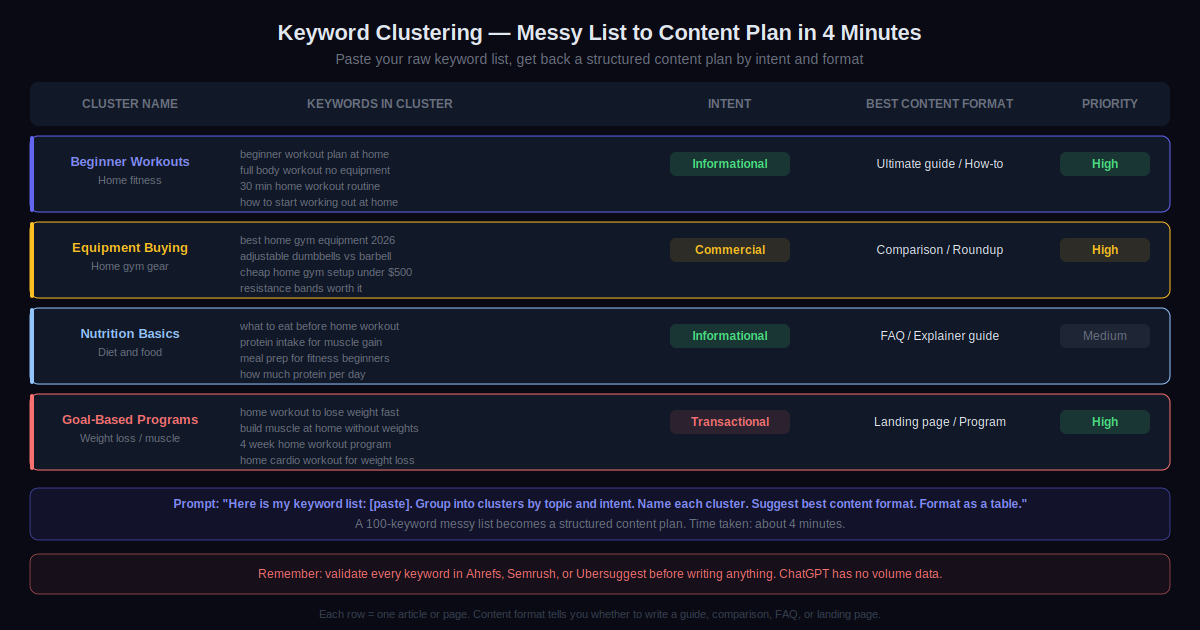
Here is a list of keywords: [paste all of them]. Group them into clusters by topic and search intent. For each cluster: give it a short name, list the keywords that belong to it, identify the dominant intent (informational, commercial, transactional), and suggest the best content format (how-to guide, comparison post, listicle, FAQ page, product page). Format as a table.
What comes back is basically a content calendar. Each row is one article or page. The format suggestion tells you whether to write a tutorial, a comparison, a roundup, or a landing page. Doing this manually in a spreadsheet used to take me two hours. With this prompt it takes four minutes and the output is cleaner.
Step 5: Find Content Gaps Your Competitors Are Filling
A content gap is a topic your competitors rank for that you haven’t written about. Finding gaps manually means crawling competitor sites one by one. ChatGPT can shortcut the ideation part of this.
Identify three to five competitors in your niche. Then:
My website covers [your topic]. My main competitors are [list them by name or URL]. Based on what's typically covered in this niche, list 20 topics that established sites probably rank for but a newer site might have missed. Sort by estimated traffic potential, high to low. Include likely search intent for each.
Important: ChatGPT can’t crawl these sites live. It’s working from training data. Treat the output as a hypothesis, not a fact. Then run the actual gap analysis in Ahrefs or Semrush to confirm which topics your competitors actually rank for that you don’t. The ChatGPT output gives you a starting list to check against real data. That combination is faster than starting from scratch in either place.
Step 6: Feed Your Search Console Data In
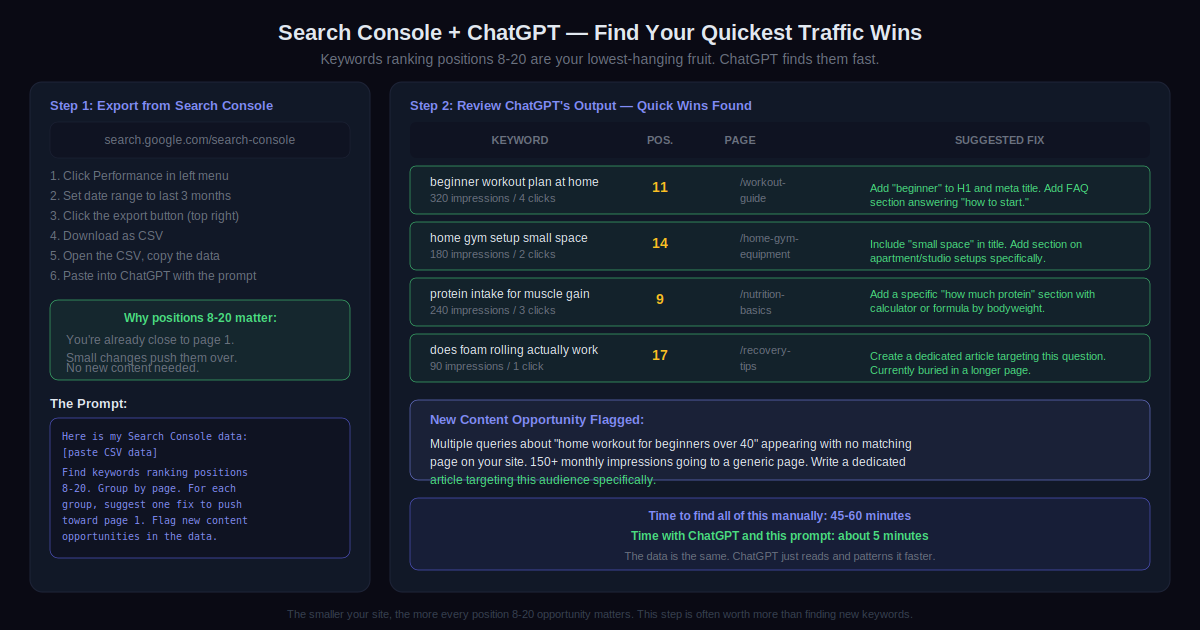
This step is the most powerful one and almost nobody does it. If your site has been live for a few months, your Google Search Console data has keyword opportunities you’re ignoring right now.
Go to Search Console. Click Performance. Export as CSV. Open ChatGPT and paste in a portion of the data. Then:
Here is data from my Google Search Console: [paste it]. Find all keywords where I rank between positions 8 and 20. These are my quickest wins. Group them by the page they're attached to. For each group, suggest one specific thing I could change on that page to push those keywords toward page 1. Also flag any keyword clusters that suggest topics I should create new content about.
Positions 8 to 20. That’s where the money is for a site that already has some traction. You’re close to page one. A better title tag, fresher content, a few internal links added. That’s sometimes all it takes. ChatGPT can spot these patterns across a large data export faster than you can read through it manually.
Even if your site is small. Even if you only have ten articles. Do this step. The smaller the site, the more every position-8-to-20 opportunity counts.
Step 7: Turn Your Keywords Into a Content Brief
Last one. Once you’ve validated your keywords and decided what to write, use ChatGPT to build the brief before you open a blank doc.
I want to write an article targeting this primary keyword: "[keyword]." Secondary keywords to include: [list them]. Target reader: [describe them in one sentence]. Give me: a recommended article title, a suggested H1, an article structure with H2 headings, 4 to 5 questions to answer within the article, and a meta description under 155 characters. Format this as a ready-to-use content brief.
This brief tells you exactly what to write before you start. Keywords show up in the right places naturally instead of being forced in later. The whole seven-step process, first time through, takes about 90 minutes. Second time, maybe an hour. After a few runs you’ll have it down to 45 minutes and you’ll have a keyword research system that’s faster than anything you were doing before.
Pro Tips
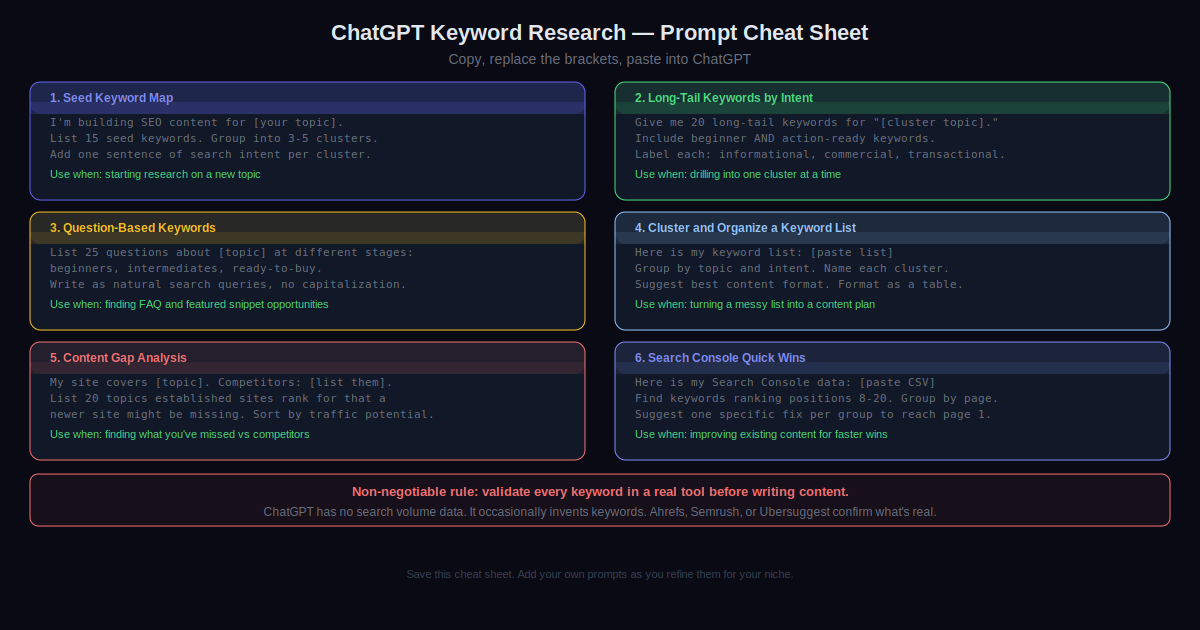
- Validate every single keyword before you write anything. ChatGPT invents plausible-sounding keywords with no traffic. It’s not doing it on purpose. It’s just predicting language patterns. The only way to know if a keyword is real is to check it in a tool with actual search data. This is the non-negotiable rule. Everything else is optional.
- Narrow your prompts aggressively. “Give me keywords about fitness” produces garbage. “Give me long-tail keywords for apartment dwellers who want to build muscle without going to a gym and don’t have space for large equipment” produces something you can actually use. The more constraints you give it, the more useful the output.
- Ask it to think like your reader, not like an SEO tool. Try: “What would someone type into Google at 10pm when they’re frustrated about not seeing results from their workouts?” That framing produces keywords that match how people actually search, not how SEO textbooks describe search behavior.
- Use the clustering prompt on any keyword list, not just ones ChatGPT generated. Got a 200-row export from Ahrefs? Paste it in and ask ChatGPT to cluster it. This is one of the most practical uses of the tool in the whole process and most people never think to try it.
- Cross-reference with Google’s People Also Ask every time. Search your main topic in Google. Screenshot the PAA questions. Paste them into ChatGPT and ask for related keyword variations. PAA questions are verified by actual user behavior. Using them as seeds gives you a much stronger signal than pure AI brainstorming.
- Keep a prompt library. The prompts in this guide took time to get right. The ones you’ll refine for your specific niche will be even better. Save them in a document as you go. Six months from now that document is one of the more useful things in your SEO toolkit.
Common Mistakes to Avoid
- Treating ChatGPT as a keyword tool instead of a thinking tool. It doesn’t have volume data, difficulty scores, or backlink analysis. The moment you start acting on its keyword suggestions without checking a real tool, you’ll spend months creating content that nobody finds. I’ve seen it happen. It’s a slow, painful realization when you finally check and realize the keywords were invented.
- One massive prompt for everything. “Give me a complete keyword strategy for my fitness blog” produces something wide, shallow, and not organized in a way you can use. Break the process into steps. One cluster, one intent, one task at a time. The quality difference between a broad prompt and a narrow one is not subtle.
- Stopping at the first response. The first answer is a draft. Refine it. “Make these more specific to someone who already has some experience” or “I need more transactional keywords, remove the informational ones” — these follow-ups consistently produce better output than starting over with a new prompt. Most people stop after one response and then complain the tool isn’t useful.
- Mixing intents on the same page. If ChatGPT’s clustering tells you a keyword is informational and another is transactional, those should not be on the same page. They serve different readers at different stages. One article trying to serve both usually serves neither. The intent labels in Step 4 are not decorative. Use them.
- Skipping Search Console because your site is new. Even three months of data has patterns worth analyzing. Even ten articles. Especially if you’re on a small site with limited resources, every quick win in positions 8 to 20 matters more than any new keyword you discover from scratch. The data you already have is underused. Fix that first.
Pick one article. Not your whole strategy. One article you’ve been meaning to write.
Run it through all seven steps today. By the end you’ll have a keyword map, a long-tail list, a question bank, a clustered content plan, and a finished content brief. Everything you need to write it. First time through takes about 90 minutes. Worth doing once just to see how the process feels before you try to apply it at scale.
After that, connect Google Search Console if you haven’t. Then come back to Step 6 in three months when you have real data to work with. That step, more than any other in this guide, is where the compounding value shows up over time.
Last thing. ChatGPT is a thinking tool. Not a data tool. The people who get the most out of it for SEO are the ones who use it to think faster, organize better, and find angles they’d have missed. They still use Ahrefs or Semrush. They still validate everything. They just don’t spend four hours in a spreadsheet doing the parts that a twenty-second prompt can handle. That’s the actual value here. Nothing more, nothing less.