Pick wrong, you waste a subscription. Pick right, you save hours every week. That’s the actual stake when someone asks me about ChatGPT vs Claude vs Gemini in 2026. They look almost identical when you open them. They aren’t.
I’ve been running all three side by side for over a year. Not for a review. For real work. Coding, writing, research, business stuff, helping my mom plan a trip to Greece (true story, ChatGPT won that one). What I’m going to walk you through is exactly what I’d tell a friend starting from zero today.
Quick note before we go: when the title says “AI,” the third name in the ring is Google Gemini. It’s the closest big-name competitor to ChatGPT and Claude, and most people end up choosing between these three. So that’s who we’re testing.
What You’ll Learn
- What ChatGPT, Claude, and Gemini are really built for (the marketing pages won’t tell you)
- How to sign up for all three on free plans, under 10 minutes total
- One simple prompt test that exposes their differences in seconds
- Which AI to grab for coding, writing, research, image gen, and Google stuff
- The honest 2026 pricing picture (it got more confusing this year)
- How to commit to one without overpaying or feeling FOMO
What You Need
Almost nothing. A browser. An email. About 30 minutes if you actually want to do the test exercises. A phone helps if you want to compare the mobile apps too, but it’s not required.
Optional: a credit card if you decide to upgrade later. Honestly though? You can get through this whole guide without spending a dime.
Quick Background: What Each AI Is Best At
Before you sign up for anything, you need to know the personality differences. The marketing pages won’t help here. Real users figured this stuff out the hard way. So did I.
ChatGPT (OpenAI)
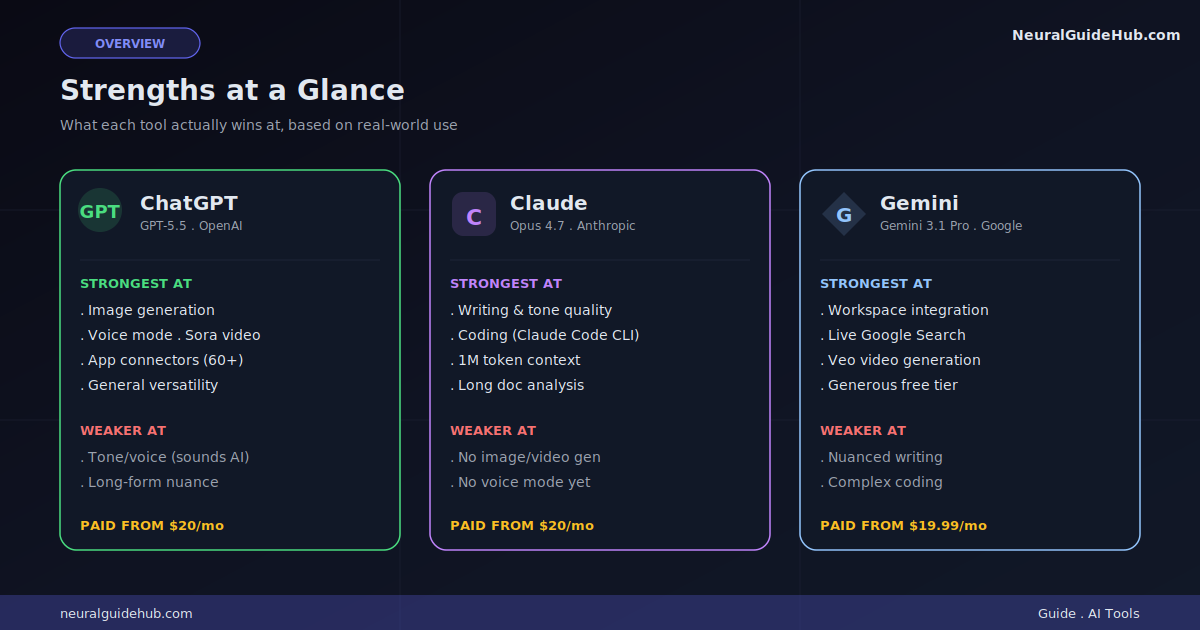
The original. The household name. In 2026 it runs on GPT-5.5 by default, with GPT-5.5 Pro on the higher tiers. Its real superpower? Breadth.
Voice mode that talks back smoothly. Image generation through GPT Image (currently leading several quality leaderboards). Sora for video. Codex for coding. Agent Mode for multi-step tasks. Sixty-plus app connectors. Want one tool that does almost everything reasonably well? This is it.
The downside: output can feel generic. Lots of “I’d be happy to help” energy. You’ll spend time editing.
Claude (Anthropic)
Claude runs on Opus 4.7, Sonnet 4.6, and Haiku 4.5. The flagship is Opus 4.7. People who care about writing quality and code reliability tend to land here. Output sounds more human out of the box. Long-form analysis is sharper, more often.
The 1 million token context window is a real differentiator. You can drop entire codebases or book-length PDFs in and have a real conversation about them. Claude’s also got Claude Code, a terminal-based coding tool that has quietly taken over a lot of professional dev workflows.
The trade-off? No image generation. No video. Weaker at fast “internet research” type tasks. And the lower tiers have tighter usage windows than I’d like.
Gemini (Google)
Gemini 3.1 Pro is the flagship. Its killer feature is integration. If your life lives inside Gmail, Docs, Sheets, Drive, and Calendar (and let’s be real, most people’s does), Gemini is built right in. It pulls context from your inbox. Summarizes a Drive folder. Drafts replies without you copy-pasting anything anywhere.
It’s also the most generous on free-tier limits, has Veo for video, and uses Google Search as a live fact-checking layer. The catch: it’s the weakest of the three for nuanced writing or complex coding. Great for fast, factual, ecosystem-bound tasks. Less great when you need a careful editor.
Step 1: Sign Up for All Three (Free Tier First)
Don’t pay for anything yet. The free tiers are good enough to compare them properly. Trust me on this.
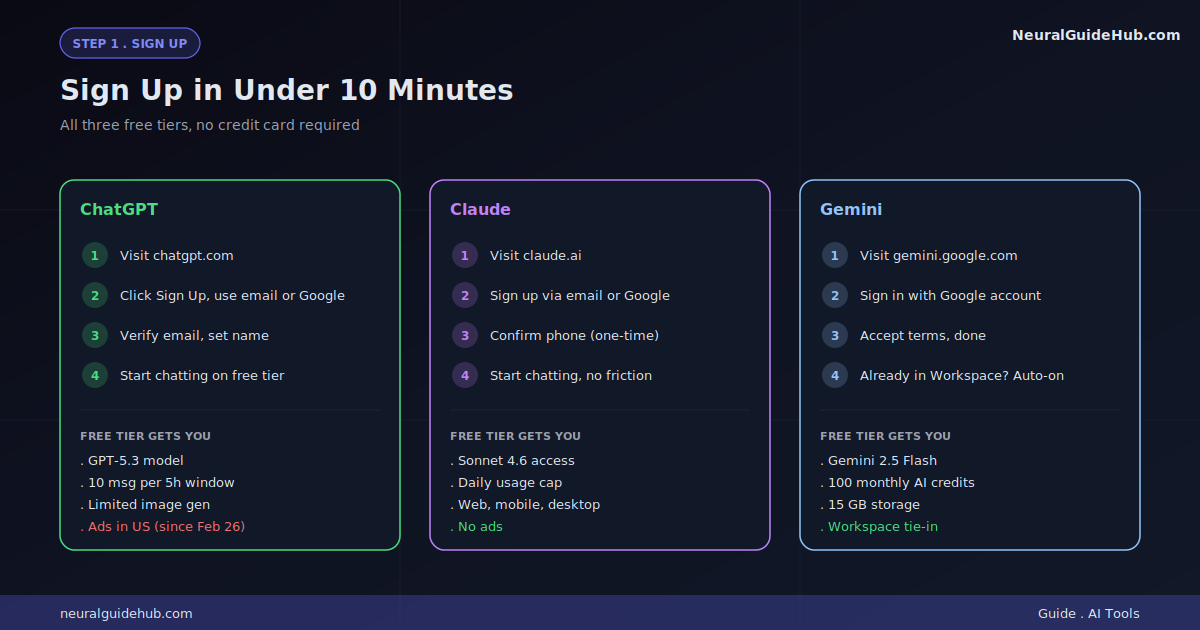
- ChatGPT. Go to
chatgpt.com. Click “Sign up.” Use email or your Google login. Free tier gives you GPT-5.3 with about 10 messages per 5-hour window. Heads up: you’ll see ads on the free tier in the US since February 2026. - Claude. Go to
claude.ai. Sign up with email or Google. Free covers web, mobile, and desktop apps with daily usage caps. No ads. Phone verification on first signup. - Gemini. Go to
gemini.google.com. Sign in with any Google account you’ve already got. Free access to Gemini 2.5 Flash, 100 monthly AI credits, and 15 GB shared storage.
Pro move: open all three in separate browser tabs side by side. That’s how you’ll be testing them in the next step.
Step 2: Run the Same Prompt Through All Three
This is where it gets interesting. The differences become obvious almost instantly when you ask the exact same thing to all three.
Try this prompt. Same wording in each one:
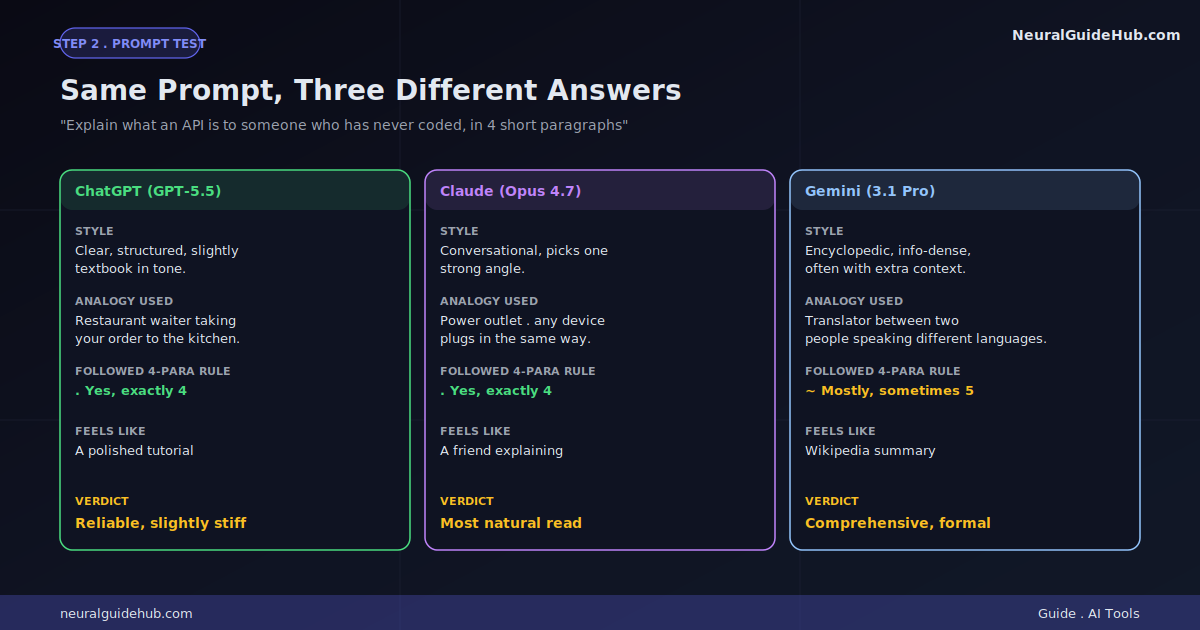
Explain what an API is to someone who has never coded, in 4 short paragraphs. Use one good analogy.
Now read all three answers back to back. Pay attention to:
- Which one sounds most natural?
- Which analogy actually clicks for you personally?
- Which one followed the “4 paragraphs” rule precisely?
- Which one feels like an actual person wrote it, not a chatbot?
Run this test a few times with different topics. Tech stuff, recipes, how something works. After three or four rounds, you’ll know your preference better than any review article could tell you.
Step 3: Test Each on a Real Task You Actually Have
Forget benchmark tasks. Use real ones from your life. Here’s a useful split based on what each AI tends to win at:
For Coding
Take a piece of broken code or something you want to build. Paste the same problem into all three. Watch:
- How fast each one understood the actual issue
- Whether the fix runs without you having to edit it more
- How clearly the explanation reads to you
In my testing across hundreds of bugs? Claude wins clean fixes more often. ChatGPT wins on “I have no idea what I’m doing, walk me through this.” Gemini wins when the bug touches Google APIs. Roughly speaking.
For Writing
Ask each one to write a 200-word email politely declining a meeting. Same brief. Read all three. Which one sounds like you? Which one would you actually send without editing?
This test made me a Claude convert for writing. Less editing time. More on-tone output. But your voice isn’t my voice, so don’t take my word for it. Test it.
For Research
Ask: Find me 5 recent (2026) studies on intermittent fasting and metabolic health, with brief summaries.
Gemini will pull live Google Search results. ChatGPT and Claude will use their built-in web tools. Compare citations. Check accuracy. See how recent the sources actually are. You’ll be surprised how often AI cites things that don’t exist or are years old. Verify before you use anything.
For Google Workspace Tasks
Try asking Gemini to summarize an email thread inside Gmail. Then try to do the equivalent with ChatGPT or Claude. The friction difference is huge. Gemini just does it. The others need you copying and pasting like it’s 2022.
For Image Generation
Only ChatGPT and Gemini compete here in any real way. Same prompt, both tools, see which output you’d actually use. Claude doesn’t generate images natively. Period. So if you make a lot of visuals, that decision’s already made for you.
Step 4: Pricing Reality Check
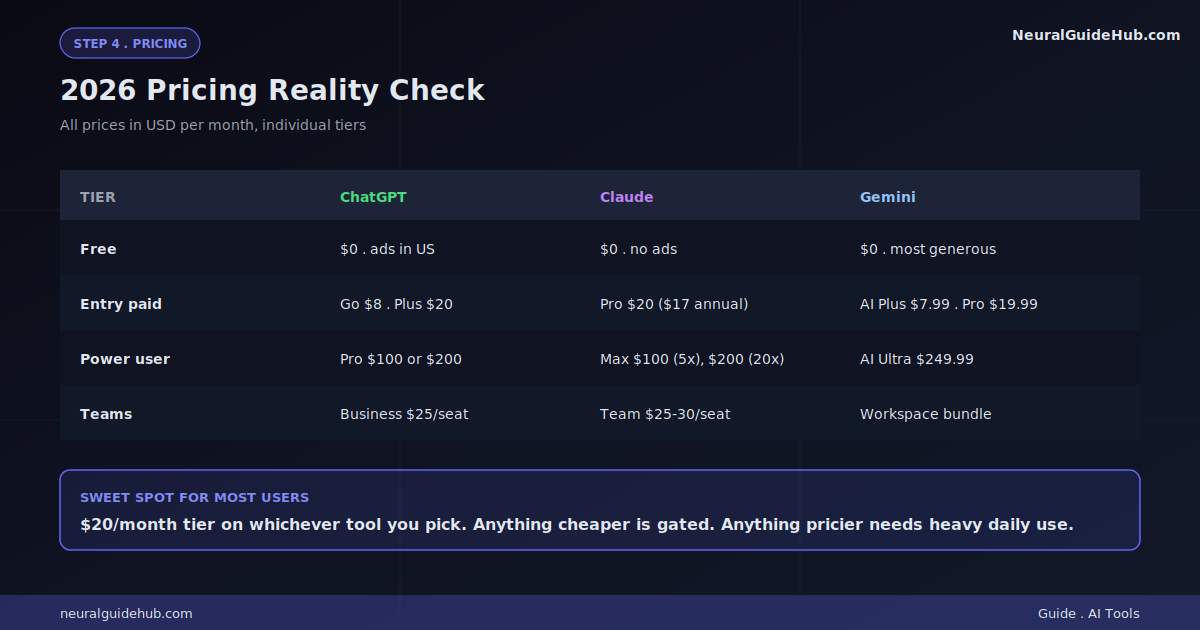
Here’s where 2026 pricing actually sits. All in USD, all monthly unless noted:
- ChatGPT: Free, Go ($8), Plus ($20), Pro ($100 or $200), Business ($25/seat), Enterprise (custom)
- Claude: Free, Pro ($20, or $17 annually), Max 5x ($100), Max 20x ($200), Team ($25-30/seat), Enterprise (custom)
- Gemini: Free, AI Plus ($7.99), AI Pro ($19.99), AI Ultra ($249.99), Workspace bundles, Enterprise (custom)
The $20 tier is where most regular users land. At that level, all three give you reasonably high usage and access to their flagship models. The big jump comes at $100 to $200, where you basically stop worrying about hitting message caps.
One thing nobody warns you about: stacking subscriptions adds up fast. ChatGPT Plus plus Claude Pro plus Gemini AI Pro? Roughly $60 a month. Not crazy if you actually use all three for different things. But I wouldn’t recommend it unless you’ve got a clear reason.
Step 5: Pick Your Daily Driver
After running the tests above, this should feel pretty obvious. But if you’re still on the fence, here’s the simple decision tree I give friends:
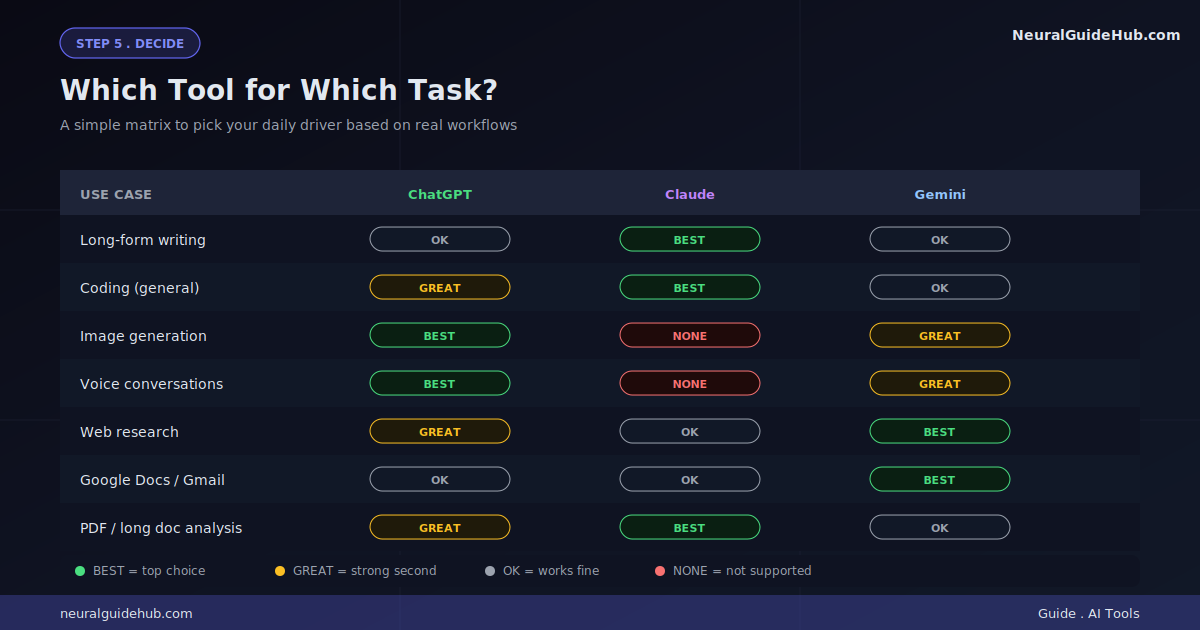
- You write a lot or code professionally: Claude Pro, $20. Worth it for the output quality alone.
- You want one tool for everything (images, voice, video too): ChatGPT Plus, $20. Most versatile.
- You live in Gmail and Google Docs all day: Gemini AI Pro, $19.99. The integration is the killer feature.
- You’re mostly curious and want free: Use all three on free tiers. Genuinely fine.
Pro Tips
- Keep the free tiers as backup. Even after you pick a paid favorite, hold onto the other two free accounts. Hitting a usage cap mid-task is brutal. The other two can rescue you. I’ve done this more times than I’d like to admit.
- Specific prompts beat clever prompts. Every time. All three respond way better to clear instructions (“Write 3 paragraphs, second person, no headers, casual tone”) than to vague creative ones. The model doesn’t need flattery or context-setting fluff.
- Try the Projects feature. Both ChatGPT and Claude have “Project” containers where you keep persistent context, files, and instructions across chats. Way more powerful than fresh chats. Most casual users never touch this. They should.
- Use voice mode for brainstorming. ChatGPT Advanced Voice is genuinely useful. Walking and talking through ideas works better than typing for some people (me included). Gemini Live is solid too. Claude doesn’t have a voice product yet, which is honestly a gap.
- Cancel and resubscribe later if you need to. If you only need a tool for one heavy month, all three let you cancel and come back. No need to lock in annually unless you really know what you’re doing.
- Mind the context window. Claude offers up to 1M tokens. Gemini Pro hits 1M. ChatGPT’s 1M context is on the Pro tier. Free tiers are smaller across the board. For long documents, this matters more than people think.
Common Mistakes to Avoid
- Subscribing before testing. Almost every $20 subscriber I know picked the wrong tool the first time. Run the free tier tests first. Always. It’s literally free.
- Using one AI for everything. Claude is bad at images. Gemini is weaker for long-form writing. ChatGPT can feel generic without good prompting. Knowing the limits saves you frustration. And money.
- Trusting AI for current facts blindly. All three hallucinate. All three sometimes cite sources that don’t exist. Verify anything that matters, especially numbers, names, and quotes. I learned this one the hard way.
- Ignoring the system prompt or custom instructions feature. Both ChatGPT and Claude let you set custom instructions that apply to every chat. Most casual users never touch these. They change everything once you do.
- Paying for Pro or Max tiers too early. The $100+ plans only make sense if you’re hitting limits regularly on the $20 tier. Track your usage for a month before you upgrade. Otherwise you’re burning $80 for nothing.
By now you should have:
- Free accounts on all three platforms
- A real sense of which one matches your voice and your tasks
- A specific paid tier in mind, or a clear reason to stay on free
Spend the next two weeks using the free tiers heavily. Just notice which one you reach for instinctively. That’s your answer. Then upgrade just that one to its $20 tier. Don’t overthink it.
The real choice between ChatGPT vs Claude vs Gemini isn’t about which is “best.” Anyone who tells you that’s the question is selling something. It’s about which one fits the way you already work. Run the test, trust the result, move on. Whichever you pick, you’re getting something that didn’t exist three years ago. That part’s still kind of wild when you stop to think about it.