I’m going to tell you something that took me embarrassingly long to figure out.
For about three months I was helping a client send cold emails using ChatGPT. We were sending 150 a week. Replies? Maybe four or five total. I kept tweaking the emails themselves — shorter, longer, different subject lines. Nothing moved the needle. Then one afternoon I actually looked at the prompts we were using and immediately understood the problem.
“Write a cold email for a B2B SaaS company targeting HR managers.”
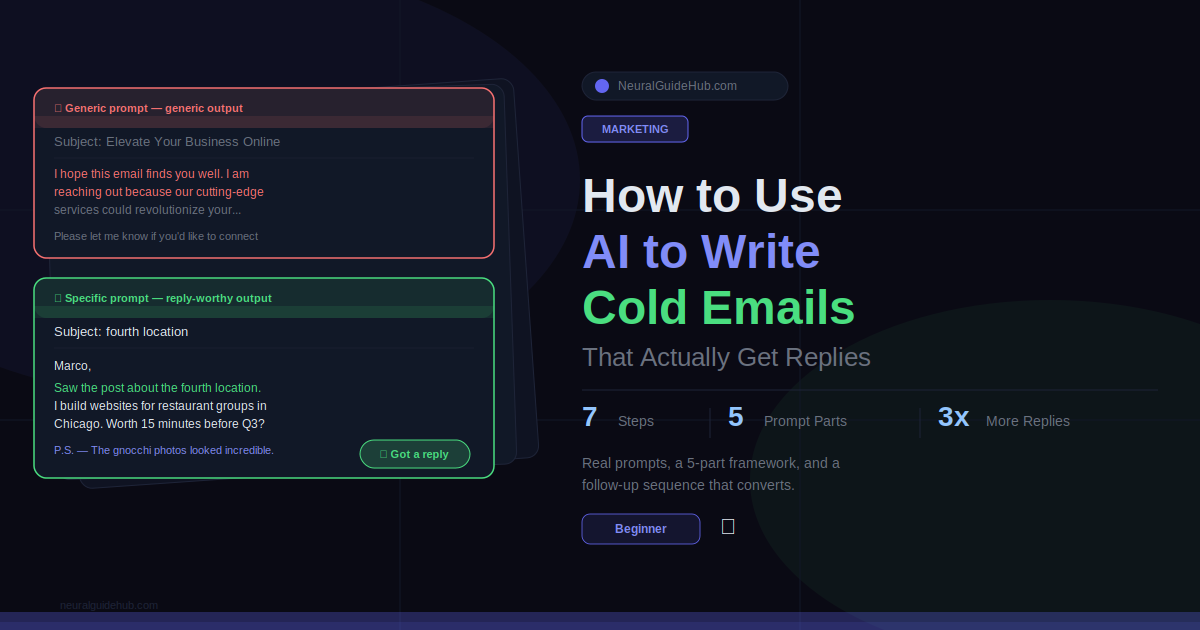
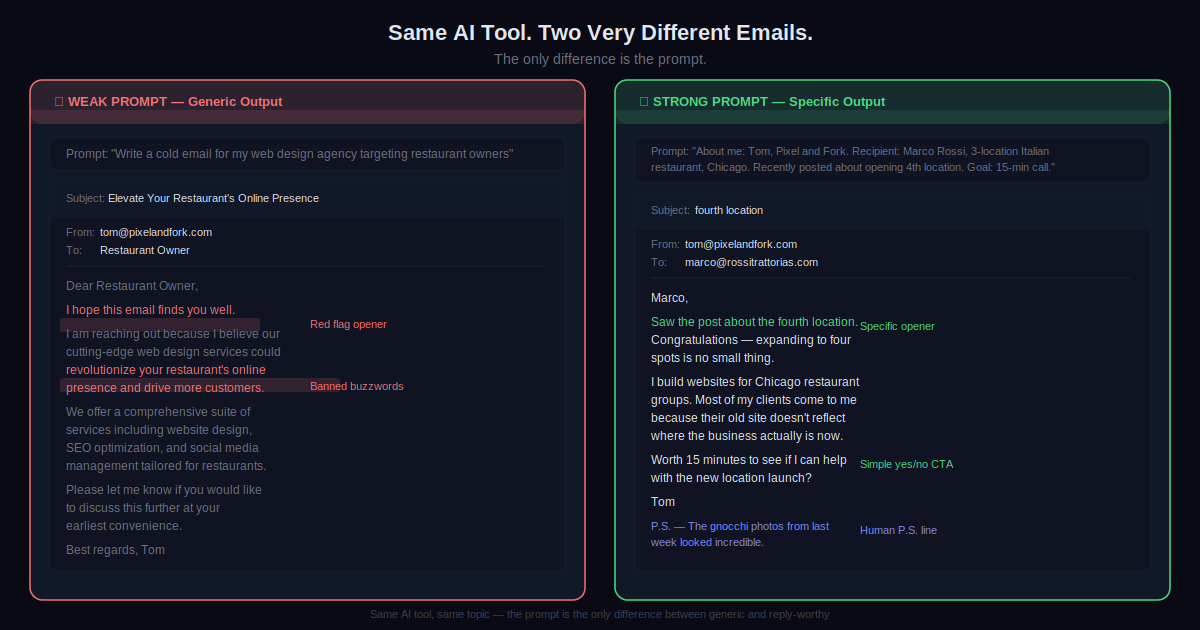
That was it. That was the whole brief. No sender info. No recipient details. No specific offer. No reason anyone should care. The AI did exactly what you’d expect with that — it wrote the most average, statistically safe cold email it could produce. And it looked exactly like every other email in every HR manager’s inbox that week.
Here’s the thing about AI cold emails that nobody tells you upfront: the AI is not the problem. The prompt is. Give it nothing, it writes for nobody. Give it real context about a real person with a real situation, and what comes back is genuinely different. This guide shows you exactly how to do that.
What You’ll Learn
- The actual reason AI cold emails fail — and it has nothing to do with which AI tool you use
- A 5-part prompt structure that gets you something usable on the first try
- Where to find one specific prospect detail that makes the whole email feel personal
- Real prompts for four different outreach scenarios you can copy right now
- Why you should write subject lines in a separate prompt and what to ask for
- A follow-up sequence most people skip — and why that’s where most replies actually come from
What You Need
- ChatGPT or Claude. Both work. Free tiers are enough. Claude writes slightly more natural-sounding email copy. ChatGPT is faster if you’re doing volume.
- A name and a company. Plus one specific thing about them. Step 3 covers where to find it.
- A clear ask. What do you want the person to do? Decide this before you open the AI. If you don’t know, the output will be vague.
- About ten minutes the first time. After you’ve done this a few times it drops to three minutes per email.
Step 1: Stop Using One-Line Prompts for AI Cold Emails
This is the whole problem. Right here.
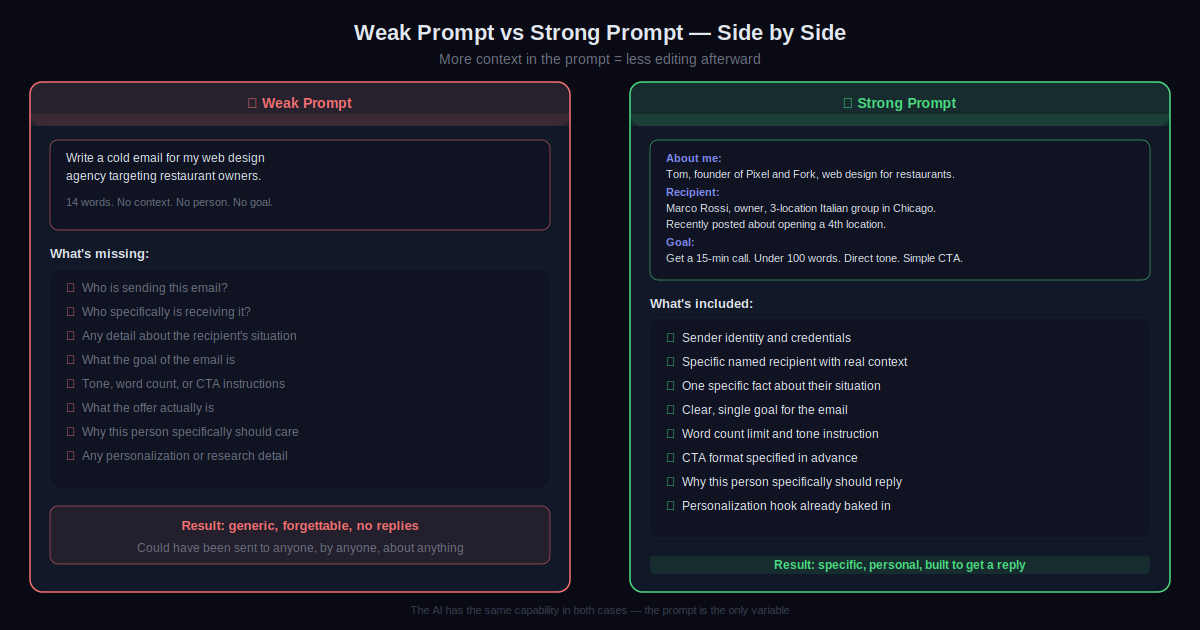
When someone types “write a cold email for my marketing agency” into ChatGPT, the AI has almost no information. It doesn’t know who you are. Doesn’t know who you’re writing to. Doesn’t know what you’ve done, what problem you solve, or why this specific person should reply instead of archiving the email immediately. So it does what it always does with an empty brief — writes something that could apply to anyone.
And anything written for anyone lands with no one.
Think of the AI like a copywriter who just started working for you today. Smart, fast, capable. But they know nothing about your business yet. If you hand them a one-sentence brief, they write a generic email. Hand them a detailed brief with real information about the sender, the recipient, the goal and the tone — they write something you can actually send.
Your prompt is the brief. That’s it. That’s the whole insight.
Step 2: Use These 5 Parts in Every Prompt
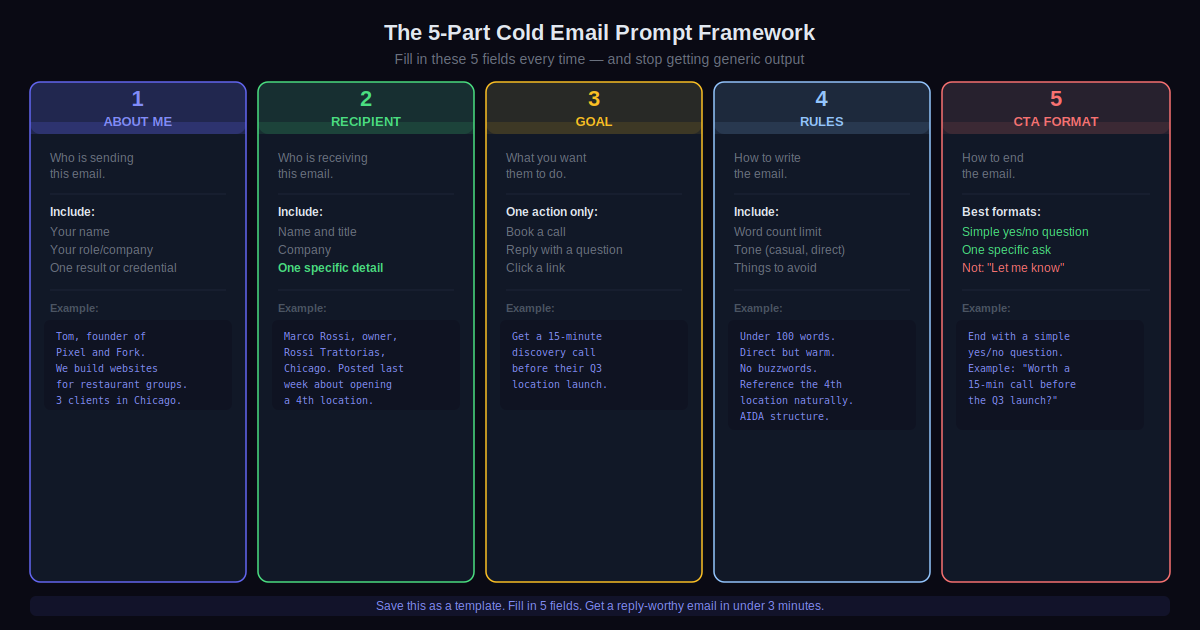
Every prompt that produces a good cold email has these five things. Use as many as you can. The more you include, the less editing you do afterward.
1. About me. Your name, role, company, one result or credential. Two sentences. Don’t make it a paragraph — the AI doesn’t need your full origin story. It needs enough to write from your perspective.
2. Recipient. Name, title, company. Plus one specific thing about them. We’ll get to where that comes from in the next step. This is the most important field in the whole prompt.
3. Goal. One thing you want them to do. Book a 15-minute call. Reply with a question. Click a link. Not three things. One. Emails with multiple goals read like they don’t know what they want, and the person receiving them doesn’t know what to do either.
4. Rules. Word count, tone, things to avoid. “Under 100 words, direct but friendly, no jargon” takes eight seconds to add and saves you from rewriting a 300-word pitch that nobody asked for.
5. CTA format. Tell the AI exactly how to phrase the call to action. “End with a simple yes-or-no question” outperforms “let me know if you’d like to connect” by a wide margin. Every time I’ve tested this. The yes-or-no question is easier to answer and feels lower-stakes.
Here’s what a full prompt looks like when you use all five:
Write a cold email. About me: James, founder of Stacklane, an email deliverability tool for SaaS companies. Recipient: Nina Park, Head of Growth at Loomly. She recently posted about declining open rates on her LinkedIn. Goal: get a 15-minute call this week. Rules: under 100 words, reference her post, casual but direct, no marketing buzzwords. CTA: end with one simple yes-or-no question.
That prompt produces something worth sending. The one-liner produces something worth deleting.
Step 3: Find One Real Detail About the Person First
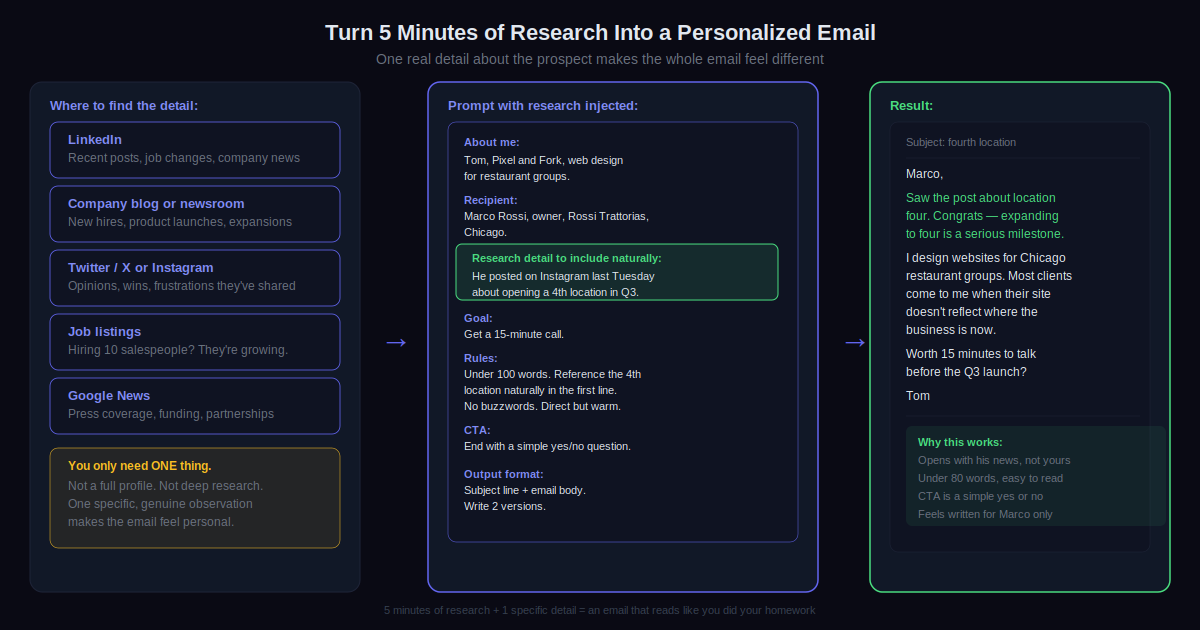
Before you open ChatGPT, spend five minutes on the prospect. Not twenty minutes. Five. You’re looking for one thing — a single specific detail that you can drop into the Recipient section of your prompt.
LinkedIn is the first place to check. Their recent posts, a job change, a comment they left on someone else’s content. Company blog or newsroom for launches and announcements. Twitter if they’re active there. Job listings work surprisingly well — a company posting ten sales roles right now is growing fast and probably has budget.
One detail is enough. Seriously, just one. “She posted last week about struggling with open rates” is enough to make the whole email feel personal. You don’t need a file on the person. You just need proof that you looked.
Add it to the Recipient section and then add this to your Rules: “Reference [the detail] naturally in the opening line.” The AI opens with something about their actual situation and the rest of the email builds from there. Compare that to an opener like “I hope you’re having a great week.”
Step 4: Write Subject Lines in a Separate Prompt
Ask for the subject line in the same prompt as the email and it comes out generic. Every time. “Quick question about your growth strategy.” “Thought this might be relevant.” These are in forty million inboxes right now.
Write the email first. Then do this in a new prompt:
Here's a cold email: [paste it]. Write 5 subject line options. Rules: under 8 words each, no clickbait, no question marks. Two should reference something specific from the email body. Two should be short and curiosity-driven. One should be a plain honest description of what the email is about.
Pick the one that fits. The plain honest one wins more than you’d expect. Especially in B2B. “Declining open rates” as a subject line beats “Unlock your email potential” because it says exactly what the email is about and doesn’t try to be clever about it. People are tired of clever. They open honest.
Step 5: Write the Follow-Up Sequence Right Now
Most replies don’t come from the first email. Second or third, usually. So if you send one and stop when nobody responds, you’re walking away from the majority of your potential responses.
Write the whole sequence in the same session as the first email. Use this:
I wrote this cold email: [paste it]. Write a 3-email follow-up sequence. Email 2 (3 days later): different angle or a new piece of value, doesn't reference the first email directly. Email 3 (7 days after email 2): short, honest, low pressure, acknowledges they might not be interested right now and leaves the door open. Each follow-up under 80 words. No "Just following up" openings anywhere. Conversational throughout.
The third email in that sequence gets a lot of replies. People were busy. They forgot. Or they needed a few weeks to think about it. A short, honest “not sure if timing is right for you but wanted to check one last time” gives them an easy yes or easy no. Both are useful. You stop wondering, they stop getting pinged.
Step 6: Edit It Before It Leaves Your Drafts
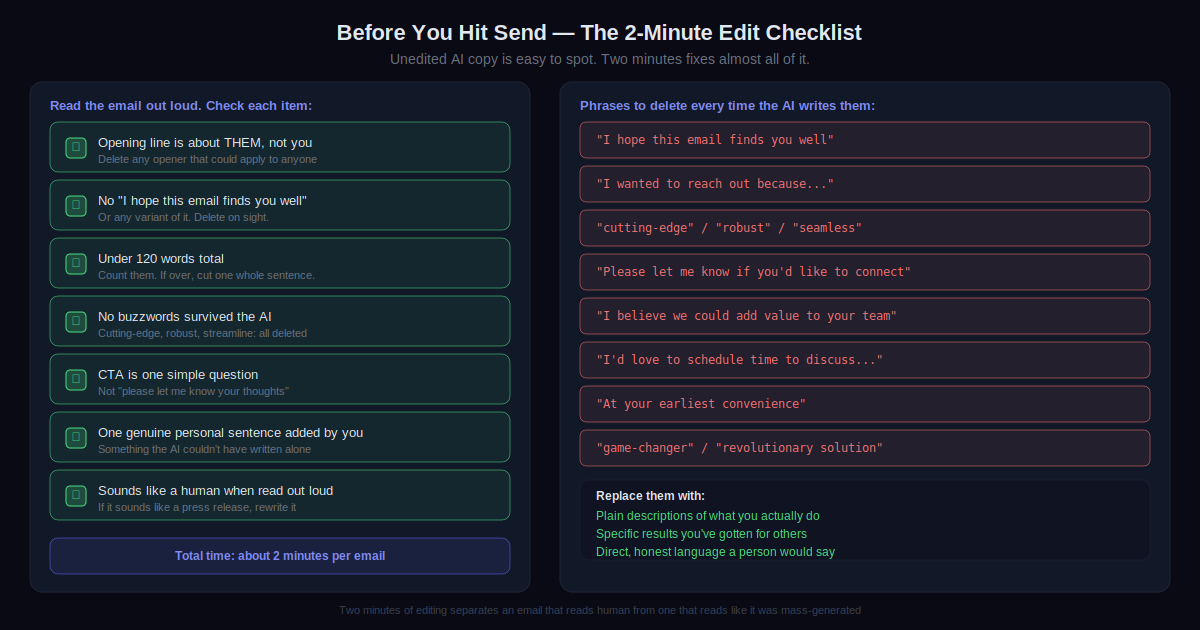
Read the email out loud. Not skim. Out loud.
If it sounds like a press release, rewrite it. If you’d never actually say those words in a conversation, cut them. If the opening line could have been sent to any person in any industry by any company, replace it with something specific to this person.
This takes two minutes. It catches almost everything wrong with AI output. The slightly too formal sentences. The repeated phrases. The words nobody uses in real life. Two minutes out loud, then send.
Step 7: Track Replies and Improve the Prompt
The first 20 emails won’t be perfect. That’s fine and expected. What matters is noticing what works.
Keep a simple note somewhere. Prompt used, subject line, whether you got a reply. After 20 or 30 sends patterns show up. Certain openers get replies. Certain subject lines get ignored completely. Certain CTAs don’t convert at all.
When an email gets a reply, feed it back: This cold email got a reply: [paste it]. What do you think contributed to the response? Give me 3 specific observations. Take those observations and fold them into your next prompt template. After a month of this, your template is tuned to your specific audience. That’s when the tool actually becomes fast and reliable.
Pro Tips
- Always ask for three versions. Add “write 3 versions with slightly different openings and tones” to any prompt. Takes ten extra seconds. You’ll almost always prefer one of the other two over the first one. Blending parts from two versions is also worth trying.
- Claude for tone-sensitive emails. Writing to someone senior or someone with a mutual connection? Use Claude. It handles nuanced tone better in my experience. ChatGPT is better for volume. Know which situation you’re in before you start.
- Save emails that got replies. When a cold email actually converts, save the prompt and the email somewhere. Six months of this gives you a small personal library of what actually works for your audience. Worth more than any list of templates someone else wrote.
- Shorter than you think. Under 120 words is the target. Under 100 is better. Tell the AI explicitly “under 100 words, cut anything that isn’t doing something useful.” Then cut one more sentence yourself before sending. Every unnecessary sentence makes the email worse.
- The P.S. line works. A short personal postscript humanizes the message in a way the main body rarely does. Ask: “Add a P.S. that references one casual non-business thing about the recipient.” Their recent travel post, a sports team mention, anything real and low-stakes. It proves a human looked. That matters.
- Same template, personalized opener. Writing to 50 people in the same industry? The body can be similar across all of them. But the first sentence should reference something specific to each person. Ask the AI to generate ten personalized opening lines for ten different prospects in one prompt. Drop each into the same template. Fast and still personal.
Common Mistakes to Avoid
- Sending raw AI output without reading it. I cannot stress this enough. Unedited AI emails have a recognizable texture now. People know. Slightly too formal, slightly repetitive, phrases that no actual human types in a real email. Two minutes of reading out loud catches almost all of it. Not doing this step is the biggest mistake I see, period.
- “I hope this email finds you well.” Delete it. Always. It signals mass email immediately and gets the email archived before the second line. The opening should be about them, their situation, their recent news. Not about hoping things are fine for them.
- Multiple things in the CTA. “Let me know if you’d like to schedule some time to discuss how we might be able to work together” is a big ask from a stranger. “Worth a 10-minute call this week?” is not. One specific action. Small and easy to answer. The difference in reply rate is significant and consistent.
- Buzzwords that AI generates by default. Cutting-edge. Robust. Seamless. Streamline. These are in more cold emails than anyone has time to count. When the AI writes them, delete them. Replace with plain descriptions of what you actually do. “We help restaurant groups get a website that works on mobile and takes online bookings” beats “We provide cutting-edge digital solutions for the hospitality sector” in every test I’ve run.
- One email and done. The majority of replies come from follow-ups. Sending one email and stopping when nobody responds means you’re leaving most of your potential responses behind. Build the sequence when you build the first email. Schedule it immediately. Commit to all three sends before you start wondering whether it’s worth it.
Pick one real prospect. Not a practice run. Someone you actually want to reach.
Spend five minutes finding one specific thing about them. Write a full prompt using the five parts from Step 2. Send it. Then immediately write the three-email follow-up and schedule those too.
You’ve now done more than most people who’ve been talking about using AI for outreach for the past year.
After 20 sends, look at what worked. Note the patterns. Feed them back into the prompt. That feedback loop is the actual work. The AI handles the writing. You handle the thinking, the research, and the refinement. That split is what makes the system actually work over time rather than just for a week.
One last thing. Save your best prompts somewhere. A notes app is fine. A folder in Google Docs is fine. Build up five to ten templates for different scenarios over the next month. First contact, follow-up, referral ask, partnership pitch. Once those exist, writing a solid cold email takes about three minutes. Not because you’ve found a shortcut. Because you’ve done the thinking once and built something you can actually rely on.