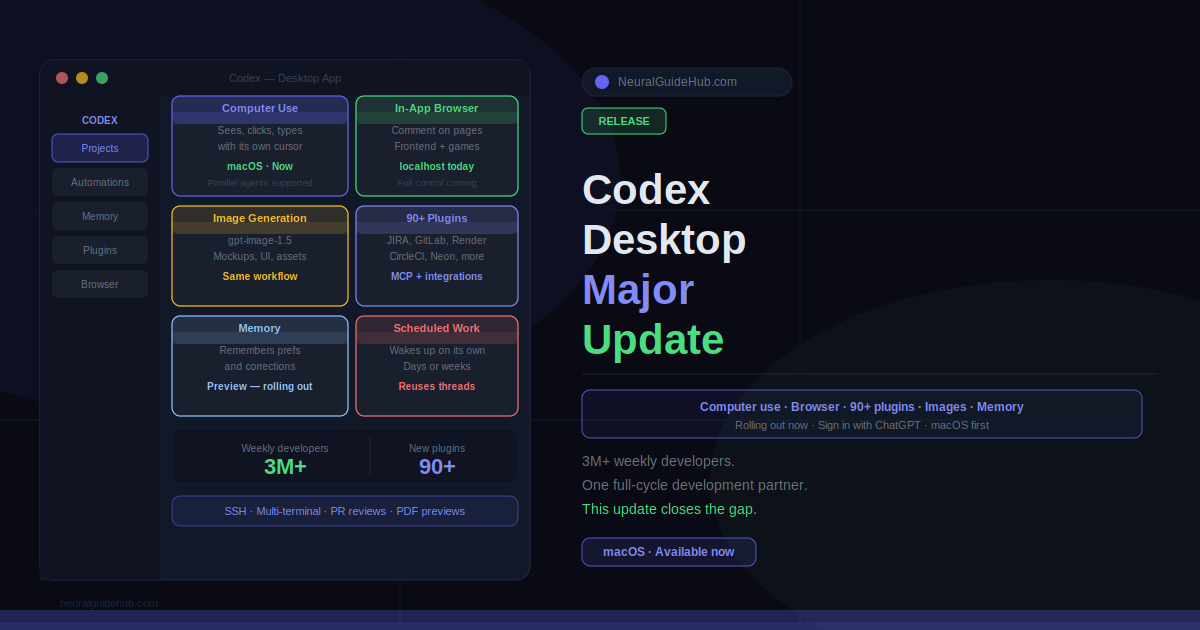
Three million developers use Codex every week. That is not a beta audience. That is a product with real usage, real friction points, and real expectations. So when OpenAI drops a major update to the Codex desktop app, the question is not whether it matters — it is whether the new features actually change how developers work, or just pad a changelog.
This update changes how developers work. Computer use, an in-app browser, 90+ new plugins, image generation, memory, and a suite of developer-specific workflow improvements all landed at once. Here is what actually matters and why.
Background Computer Use: Codex Gets Its Own Cursor
This is the headline feature. Codex can now operate your computer alongside you — seeing, clicking, and typing with its own cursor while you continue working in other apps. Multiple agents can run in parallel on your Mac without stepping on each other or interfering with what you are doing.
The practical value is clearest for frontend work, testing, and any application that does not expose an API. If you have been manually switching between your editor, a browser, and a test environment to iterate on UI changes, Codex can now handle that loop without you managing every step. It sees the screen, interprets the state, and acts.
Computer use is available on macOS at launch. EU and UK users get access soon.
In-App Browser and Image Generation
The Codex desktop app now includes an in-app browser. You can comment directly on pages to give the agent precise, context-specific instructions. No more describing what you are looking at — you point at it. For frontend development, game development, and localhost web apps, this removes a significant amount of friction from the feedback loop.
OpenAI plans to expand browser control beyond localhost applications over time, which would make this a much more powerful capability. For now, it is genuinely useful for the use cases it covers.
Alongside the browser, Codex now integrates gpt-image-1.5 for image generation directly inside the workflow. Combined with screenshots and code, this is useful for product mockups, frontend visual concepts, and game assets — without leaving the editor to open a separate image generation tool. The generation and iteration loop stays in one place.
90+ New Plugins Across the Full Stack
Codex ships with over 90 additional plugins in this update. These combine skills, app integrations, and MCP servers to expand what Codex can access and act on across your toolchain.
The new additions developers will find most relevant: Atlassian Rovo for JIRA management, CircleCI, CodeRabbit, GitLab Issues, Microsoft Suite, Neon by Databricks, Remotion, Render, and Superpowers. That covers a meaningful portion of the modern development stack — CI/CD, issue tracking, deployment, and database tooling in one plugin layer.
Developer Workflow Improvements
The release also includes a set of improvements specifically aimed at the day-to-day mechanics of software development. GitHub review comment support means Codex can now address PR feedback directly. Multiple terminal tabs are available for running parallel processes. SSH connection to remote devboxes is in alpha.
The sidebar now lets you open files with rich previews for PDFs, spreadsheets, slides, and documents. A new summary pane tracks agent plans, sources, and artifacts so you can follow what Codex is doing without reading every log line. These are quality-of-life improvements that add up quickly across a full work session.
Memory and Continuous Work
Two features here that deserve separate attention. First, memory: Codex now retains useful context from previous sessions — personal preferences, corrections, and information that previously required long custom instruction blocks to preserve. Future tasks complete faster and at higher quality because Codex already knows the relevant context about how you work.
Second, automations now support re-using existing conversation threads and preserving the context built up in them. Codex can schedule future work for itself and wake up automatically to continue a long-running task — potentially across days or weeks. Teams already use this for landing open pull requests, following up on tasks, and staying on top of conversations across Slack, Gmail, and Notion.
The proactive suggestions feature builds on top of both. Using context from connected plugins, projects, and memory, Codex can now suggest how to start your work day or where to pick up on an unfinished project. For example: it can identify open comments in Google Docs requiring your attention, pull relevant context from Slack and Notion, and hand you a prioritized action list before you have even decided where to begin.
All of these updates are rolling out now to Codex desktop app users signed in with ChatGPT. Personalization features including context-aware suggestions and memory will reach Enterprise, Edu, EU, and UK users soon. Computer use is macOS-only at launch.
If you have been using Codex in the terminal or inside your editor and have not tried the desktop app, this update is the reason to switch. The workflow improvements, browser integration, and memory features make it a meaningfully different experience from CLI-only usage.