Anyone who’s run multiple Claude Code agents in parallel knows the chaos. Three terminal tabs, two tmux panes, a sticky note tracking what each one is doing. Half the time I forget which session was waiting on my input and which was still working. Anthropic just shipped something that fixes this. The Claude Code agent view puts every active session in one screen. You see what’s running, what needs you, and what’s done. All at once.
I’ve been testing it since the rollout. The terminal-tab juggling I used to do has basically disappeared. Here’s what this actually changes and how it works.
What the agent view actually does
Before this update, running parallel agents in Claude Code meant managing your own attention across multiple terminal instances. I’d kick off one agent in tab one, switch to tab two, lose track of when tab one finished, miss a question it was asking, come back to a stalled session. The cost wasn’t the tool. The cost was the mental overhead.
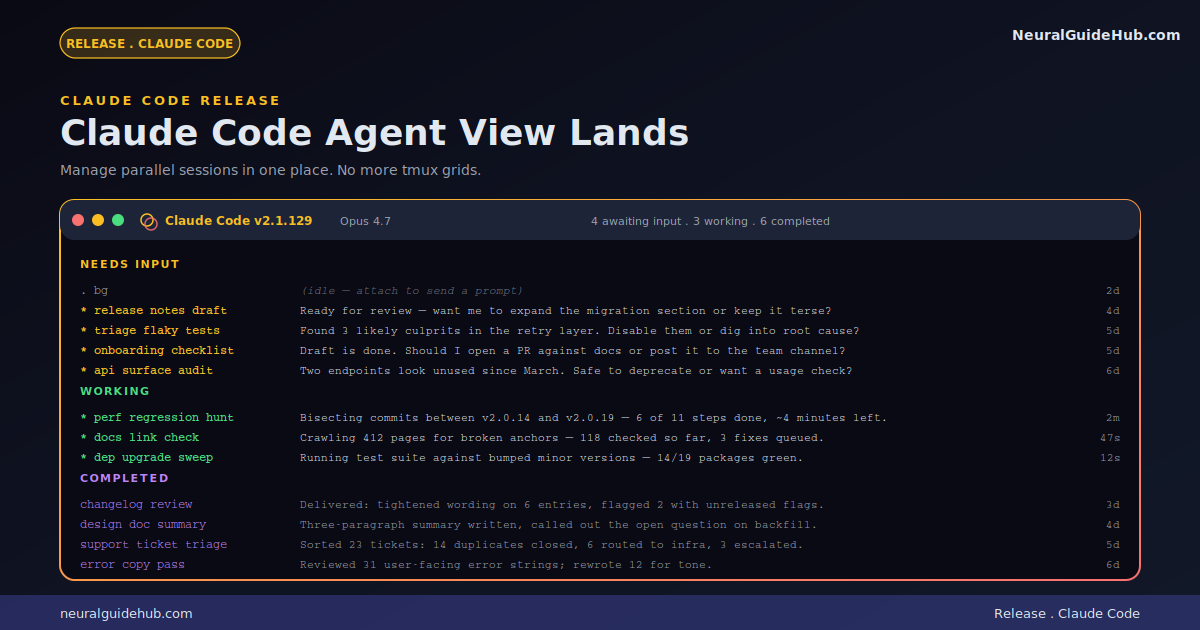
Agent view collapses all of that into a single interface. Press the left arrow from any session, or type claude agents from the terminal. You get a list of every session you have running. Each row tells you the session name, whether it needs input, what its last response was, and when you last touched it.
The interface splits things into three states. Sessions waiting on input show up first, marked clearly. Sessions still working come next. Completed sessions sit at the bottom. You can scan the whole list in three seconds and know exactly which session needs your attention.
Peek mode changes how you respond
This is the part I didn’t expect to like as much as I do. When a session is waiting on a decision, you don’t have to fully attach to it to answer. Just select it from the agent view and you can peek at the last turn without committing to the session. If the answer is simple, you reply inline and the agent picks back up. If you want to dig deeper, press enter to attach directly to the full transcript.
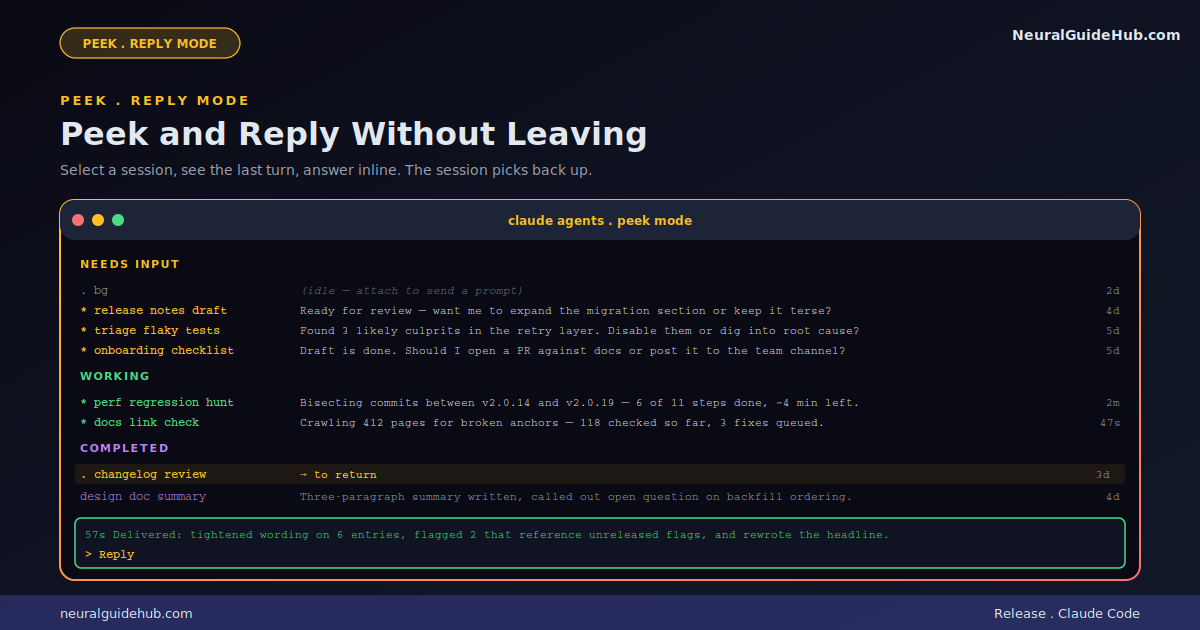
The practical effect is that you stop losing context when you switch between agents. With multiple terminal tabs, every switch costs you a couple of seconds of “wait, what was this one doing again?” With peek, that overhead disappears. You see the question, you answer, you move on.
Background mode for long-running tasks
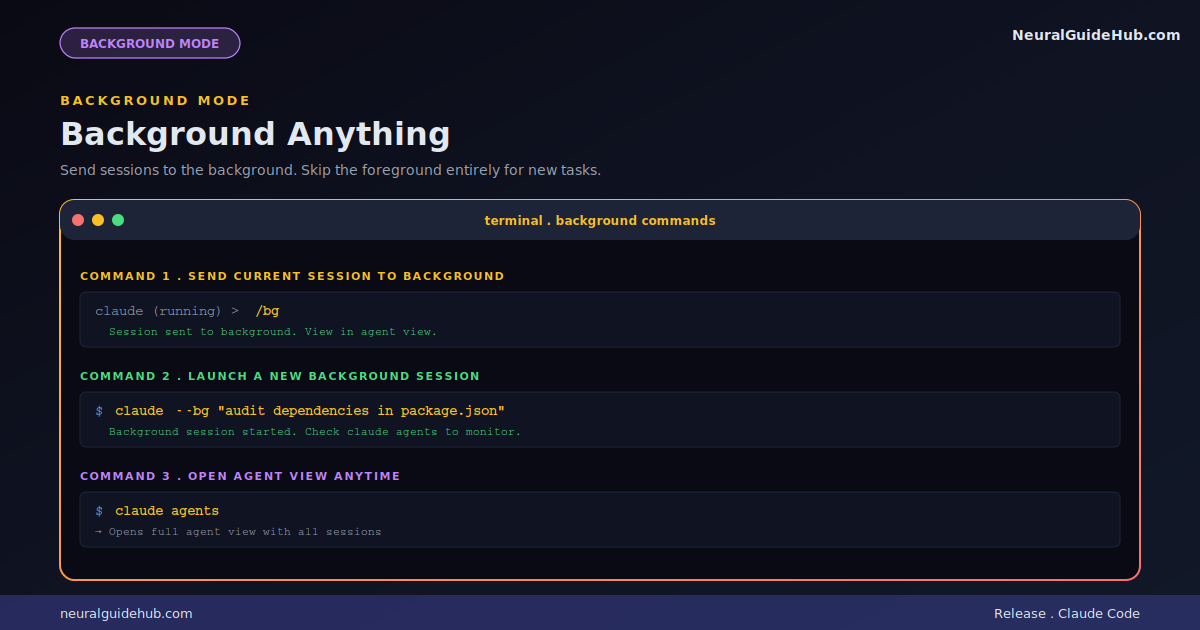
The third addition is what Anthropic calls background mode. You can take any existing session and send it to the background using /bg. Or you can skip the foreground entirely with claude --bg [task] when you want to fire off a new agent without watching it work.
This matters more than it sounds. Long-running tasks used to mean a terminal tab I couldn’t close. Now they run in the background, show up in agent view when they need me, and otherwise stay out of my way. PR babysitters, dashboard updaters, anything that loops on a schedule, all of it works better when it’s not competing for foreground attention.
How I’m actually using it
A few patterns I’ve fallen into since this rolled out. The first is scaling concurrent sessions. I’ll dispatch three or four ideas at once, each one paired with a different skill, and come back later to a list of pull requests ready for review. The mental cost is roughly the same as one session, but I get four times the output.
The second is using it for what Anthropic calls long-running agents. Tasks that loop on a schedule. The next run time shows right in the list, which means I always know when something is about to fire. No more wondering if a job is dead or just waiting.
The third pattern is mid-session navigation. I’ll be deep in one task, hit the left arrow, fire off a quick codebase question or a related task, then arrow right back into what I was doing. Peek shows me the answer when it lands. The original session never gets interrupted.
Status indicators that actually help
One small detail worth calling out. Each row in agent view shows a status indicator. Plus a session title in peek mode. Together, those two things make it easy to scan which sessions actually produced something. PRs shipped. Files changed. Tasks completed. Instead of digging through scrollback to figure out what happened, the answer is right there on the list.
For anyone running multiple agents on production work, this is the difference between “I think that one shipped” and “I know exactly which three are done.”
Why this update matters
Most coding agent updates focus on model capability. Bigger context, better reasoning, sharper code generation. This one is different. The model didn’t change. The interface around the model did.
That’s actually the more interesting story to me. Once these agents got capable enough, the bottleneck stopped being intelligence and started being orchestration. How do you actually use ten agents at once without going insane? How do you keep track of what each one is doing? How do you know when to intervene and when to let them run?
Agent view is Anthropic’s answer to those questions. It’s not flashy. It’s not a model release. But for anyone running real parallel work, it changes the daily experience significantly. Less time managing tabs. More time directing actual work.
What to try first
If you have Claude Code installed, you already have access. The agent view ships in the latest version. Press the left arrow from any session and you’ll see it. Or type claude agents from a fresh terminal.
My suggestion if you’ve never used parallel agents seriously before: start with two sessions. Get comfortable with the peek and reply pattern. Then add a third. The point isn’t to run ten sessions at once on day one. The point is to remove the friction that’s been keeping you from running more than one.
The Claude Code agent view is the kind of update that doesn’t get the same buzz as a new model. But for people who actually use these tools daily, it’s one of the more useful things Anthropic has shipped this year. Worth ten minutes to try.