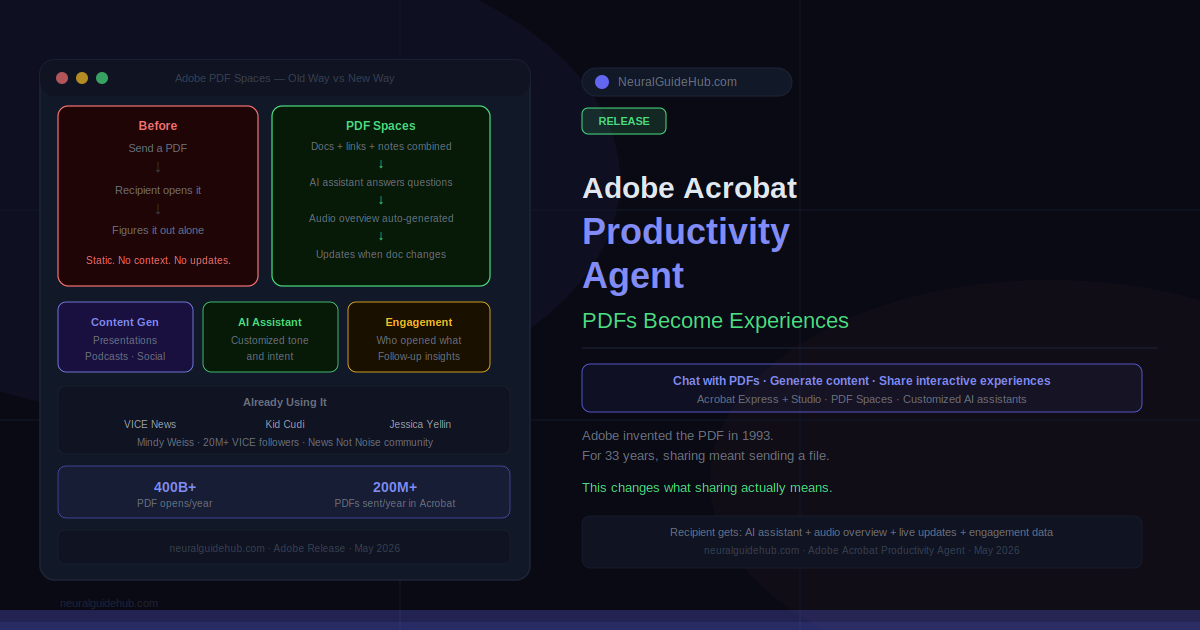
400 billion PDF opens per year. 200 million PDFs sent in Acrobat alone. And in almost every one of those cases, the person on the receiving end opens a file, reads what they read, and closes it. No way to ask a question. No audio overview for context. No signal back to the sender showing what got read and what didn’t. That’s the problem Adobe’s new Adobe productivity agent is built around. Not a faster PDF editor. A different kind of document entirely.
The agent is live now inside Acrobat Express and Acrobat Studio. It generates presentations, podcasts, social posts, and blog content from your documents. But the more significant change is PDF Spaces — a new sharing format where recipients get an interactive experience instead of a static file, with a customized AI assistant attached and engagement data coming back to the sender.
What the Adobe Productivity Agent Actually Changes
Two things happening here, worth keeping separate.
First: content generation. Drop in a PDF or a set of documents and the agent produces a presentation, a podcast episode, or social content from that material. Useful for anyone pushing the same research across multiple formats without rebuilding it each time. Practical. Not the main story.
Second thing is the format shift. When you share a PDF Space, the person receiving it doesn’t get a file. They get a structured experience — documents ordered and contextualized how you want, an AI assistant calibrated to answer questions in your tone, an auto-generated audio overview, and live updates whenever the source document changes. You get back engagement data. Who opened it. Which sections got time. Where they stopped.
That last piece is genuinely new. Knowing that the client spent eight minutes on your pricing section and skipped the case studies entirely changes how you follow up. Adobe is baking that signal into the sharing format rather than making it a separate analytics product.
PDF Spaces: The New Sharing Format
You bring documents, links, and notes into one Space. The agent generates summaries and an audio overview. You reorder files, add context, and configure the AI assistant — what tone, what to emphasize, what questions it should handle. Add a logo and brand colors. Send it.
The use cases track with real workflow problems. Sales proposals combining case studies, pricing, and testimonials in one branded experience — with data showing which stakeholders read what. HR onboarding packages where the AI assistant handles repetitive questions. Board pre-reads distributed as a single coherent narrative instead of six separate PDF attachments in an email.
Customization matters more than it sounds. When the recipient feels like the experience was built for them specifically — not just a folder of files — the engagement is different. Adobe’s bet is that this gap between a polished shared Space and an email attachment is wide enough to change behavior at scale.
Who Is Already Using It
VICE News is using PDF Spaces for reporting. Layering primary documents and research directly alongside published stories, with an AI assistant letting readers go deeper into sources. Kid Cudi’s team is using it for his new podcast, Big Bro with Kid Cudi — behind-the-scenes content tied to episodes, accessible through a Space. Jessica Yellin of News Not Noise is using it to provide source context for her coverage. Mindy Weiss, the event planner, is sharing planning expertise with followers through it.
The range is intentional. Journalism, podcasting, event planning, news commentary — Adobe is not positioning this as enterprise-only. The format is meant to work wherever someone needs to share structured information with an audience that has questions and wants to dig deeper.
Adobe Productivity Agent and the Bigger Strategy
Adobe is building two agents in parallel. Creative agent for image and content creation. Productivity agent for document intelligence, synthesis, and sharing. They’re designed to work together and with third-party agents. Standard interoperability story for 2026.
The document intelligence foundation Adobe brings here is real. Processing PDFs at scale since 1993 — longer than most AI companies have existed. The question is whether PDF Spaces is differentiated enough to pull people away from the tools they already use for this problem. A Notion page, a Google Doc, a Loom video. Free, fast, already in the workflow.
Two things will determine whether this works. How well the AI assistant performs on messy real-world documents — not polished demo content, but actual enterprise files with inconsistent formatting and missing context. And how fast setup actually is under deadline pressure. If sending a Space takes five minutes, it competes. If it takes thirty, most people will attach a PDF and move on.
https://news.adobe.com/news/2026/05/adobes-new-productivity-agent