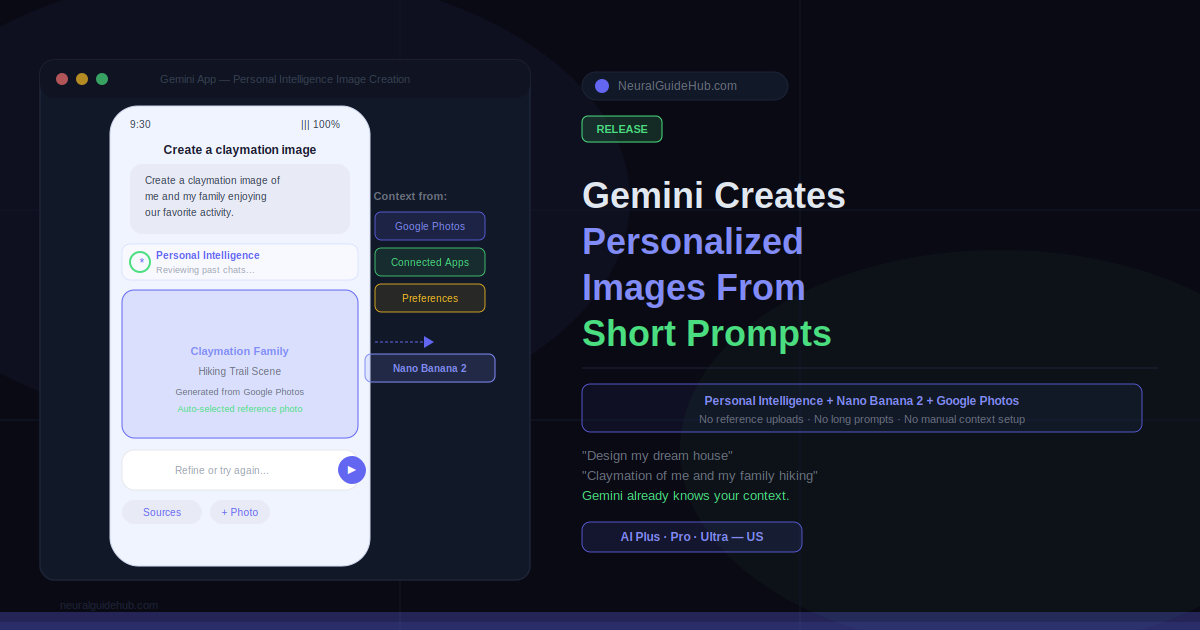
There is a specific kind of frustration that comes with AI image generation. You know what you want. You just cannot get the tool to know what you want. So you write a long prompt. You upload a reference photo. You explain your aesthetic, your setting, your preferences. Then you get something close but not quite right, and you do it all over again. The context transfer is the hard part, not the creativity.
Google just addressed that directly. The Gemini app now uses Personal Intelligence and Nano Banana 2 to generate Gemini personalized images from short, simple prompts automatically pulling context from your connected Google apps and Google Photos library. No reference photo uploads. No lengthy descriptions. Just a prompt and a result that actually reflects your life.
Powering Your Imagination with Personal Intelligence
The core change here is where the context comes from. Previously, getting a result that felt genuinely personal required you to manually supply everything. Long prompts, uploaded photos, detailed descriptions of your preferences. You were the bridge between your life and the AI.
Personal Intelligence removes that bridge. By integrating your preferences directly with Nano Banana 2, Gemini now fills in the blanks automatically. If you have already connected your Google apps, that context is ready the moment you start creating. No extra setup. No new configuration.
The difference in practice is significant. A prompt like “Create a watercolor image of my dream house nestled in my favorite setting” now produces something grounded in your actual tastes and lifestyle, pulled from the apps you have connected. Not a generic house in a generic landscape. Something that feels like yours.
Starring You and Your Loved Ones
The Google Photos integration goes further than preference context. It uses actual images from your library to guide the generation process. Because Google Photos already lets you organize and label groups of people and pets, those labels become the input Gemini needs to put the right faces in the right images.
A prompt like “Create a claymation image of me and my family enjoying our favorite activity” will generate that specific scene with the right people, in the right style without you manually finding, downloading, and uploading any photos. The library you have already built does the work.
Style options are open too. Claymation, watercolor, charcoal sketch, oil painting you pick the aesthetic and Gemini handles the rest. Quick idea, custom creation, no file management in between.
Putting Creative Control in Your Hands
First results will not always be perfect. Google built in several ways to refine without starting over. If the output misses something, you can tell Gemini what was wrong and regenerate. You can tap the ‘+’ icon to select a different reference photo from your Google Photos library if you want a different perspective or starting point.
A Sources button shows you which image was auto-selected to guide the creation, so you can understand why the result looks the way it does. You can also ask Gemini directly for attribution information about the sources used for a specific image. The process is transparent, not a black box.
Privacy: What Changes and What Does Not
Personalization and privacy are in real tension with this kind of feature, and Google’s position is worth stating clearly. The Gemini app does not directly train its models on your private Google Photos library. Training uses limited information specific prompts and model responses to improve functionality over time, not your personal photos.
Connecting Google apps to Gemini remains entirely opt-in. You can adjust which apps are connected in your settings at any time. The Personal Intelligence context only applies if you have chosen to connect those apps.
Availability
The new personalized image creation experience is rolling out over the next few days to eligible Google AI Plus, Pro, and Ultra subscribers in the US. Google plans to bring it to Gemini in Chrome on desktop and expand to more users after the initial rollout.
If you are already on one of those plans and have your Google apps connected, the feature will be waiting in the Gemini app when it reaches your account. No additional setup required beyond what you have already done.
https://blog.google/innovation-and-ai/products/gemini-app/personal-intelligence-nano-banana