The way developers actually use agentic coding tools has shifted considerably over the past year. A single prompt, wait for output, review, repeat that was the early workflow. What it looks like now is closer to this: a refactor running in one repo, a bug fix in another, a test-writing pass in a third, and you switching between them as results come in, steering where needed, reviewing diffs before anything ships.
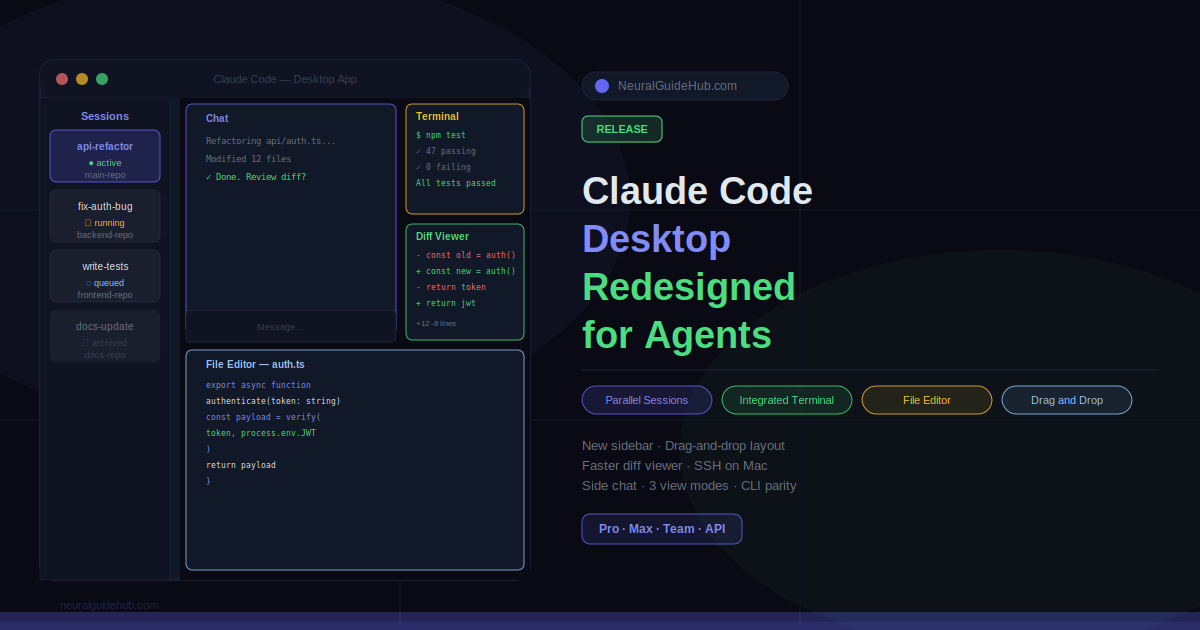
Anthropic’s redesigned Claude Code desktop app is built for that second pattern. The update ships a new sidebar for parallel session management, a drag-and-drop workspace layout, an integrated terminal and file editor, a faster diff viewer, and a set of reliability and performance improvements under the hood. It is available now for Pro, Max, Team, and Enterprise plan users and via the Claude API.
Parallel Sessions in the New Claude Code Desktop Sidebar
The most significant change is the sidebar. Every active and recent session now lives in one place, making it practical to run work across multiple repos simultaneously and switch between them as results arrive.
The sidebar can be filtered by status, project, or environment, and grouped by project for faster navigation. When a session’s pull request merges or closes, it archives itself automatically, keeping the sidebar focused on what is currently live rather than accumulating a backlog of completed work.
A new side chat feature (⌘ + ; on Mac, Ctrl + ; on Windows) lets you ask questions mid-task without disrupting the main thread. Side chats pull context from the active session but do not write anything back to it, which prevents a clarifying question from accidentally redirecting a long-running task.
Review and Ship Without Leaving the App
The redesign brings several tools into the app that previously required switching to an external editor or terminal. The goal is to close the review loop without context-switching.
The integrated terminal lets you run tests or builds directly alongside a session. The in-app file editor lets you open files, make spot edits, and save changes without leaving the interface. The diff viewer has been rebuilt for performance on large changesets, which matters when Claude has touched dozens of files in a single pass.
The preview pane now supports HTML files and PDFs in addition to local app servers, which extends its usefulness beyond web development workflows to documentation review and report generation.
Every pane in the interface is drag-and-drop. Terminal, preview, diff viewer, chat — arrange them in whatever grid configuration fits the specific task you are working on.
Stack Compatibility and SSH Support
The desktop app now has full parity with CLI plugins. If your organization manages Claude Code plugins centrally, or you have installed your own locally, they work in the desktop app exactly as they do in the terminal. No separate configuration required.
SSH support has been extended to Mac alongside existing Linux support, so you can point sessions at remote machines from either platform. Sessions can still run locally or in the cloud depending on your setup.
View Modes, Keyboard Shortcuts, and Usage Tracking
Three view modes — Verbose, Normal, and Summary — let you adjust how much of Claude’s tool call activity is visible. Verbose shows full transparency into what Claude is doing. Summary shows just the results. The middle option sits between them.
New keyboard shortcuts cover session switching, spawning, and navigation. Press ⌘ + / (or Ctrl + /) to see the full list. A new usage button shows both context window and session usage at a glance, which is useful for managing longer sessions or understanding why a particular session is running slowly.
Under the hood, the app has been rebuilt for reliability and now streams responses as Claude generates them rather than waiting for a complete response before rendering.
Availability
The redesigned Claude Code desktop app is available now. Download it fresh or update and restart if you already have it installed. Documentation covering the new features is available at docs.anthropic.com.
The release is available on Pro, Max, Team, and Enterprise plans, and via the Claude API for teams building on top of Claude Code programmatically.