You have an idea. Not a vague “wouldn’t it be cool if” idea, but a real one. You’ve thought about who would use it, what problem it solves, and you’re pretty sure there’s something there. The problem is, building a full product takes months and you don’t have months. You have a weekend, maybe two. That’s where Claude Code MVP development comes in, and if you approach it correctly, it’s genuinely possible to ship something real and testable in that window.
This isn’t about generating a demo that looks good in a screenshot. This is about building a working product you can put in front of actual users, get honest feedback from, and decide whether to keep investing in. That distinction matters, and most guides about using AI coding tools miss it entirely.
What You’ll Learn
- How to write a spec document that Claude Code can actually execute against
- The exact prompting approach that produces clean, maintainable code instead of tangled one-shot output
- How to scope an MVP ruthlessly so you ship something real instead of a half-finished product
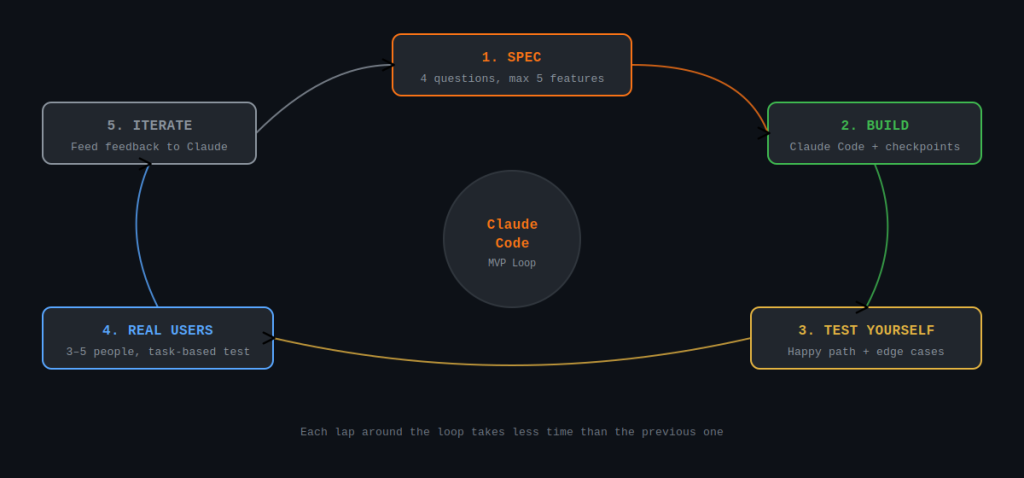
- The iteration loop that turns Claude Code into a fast feedback machine
- Common scope and technical mistakes that kill MVPs before they ever reach a user
What You Need
- Claude Code installed — available via npm:
npm install -g @anthropic-ai/claude-code - An Anthropic account with API access (Claude Code runs against the API, not the web interface)
- Node.js 18+ or Python 3.10+ depending on what you’re building
- A clear product idea — not a wish list, an actual problem statement with a defined user
- Basic terminal familiarity — you don’t need to be a senior engineer, but you need to be comfortable running commands
You don’t need to be a strong developer to use Claude Code effectively. But you do need to understand what you’re reading when it generates code, at least well enough to spot when something looks wrong. Completely non-technical users tend to hit a wall during the iteration phase.
Step 1: Define the Problem, Not the Product
Before you open a terminal, write one paragraph that answers this: who has this problem, what is the problem, and why haven’t they solved it yet? This isn’t a formality. It will directly shape every prompting decision you make.
A weak starting point sounds like: “I want to build a habit tracker app.” A strong one sounds like: “Freelance writers forget to send invoices because they context-switch constantly. I want a tool that logs billable work as they do it and prompts them to invoice at the end of the day.” Same product category, completely different focus. The second version tells you what to build, what to leave out, and what success looks like.
Write It Down Before You Prompt Anything
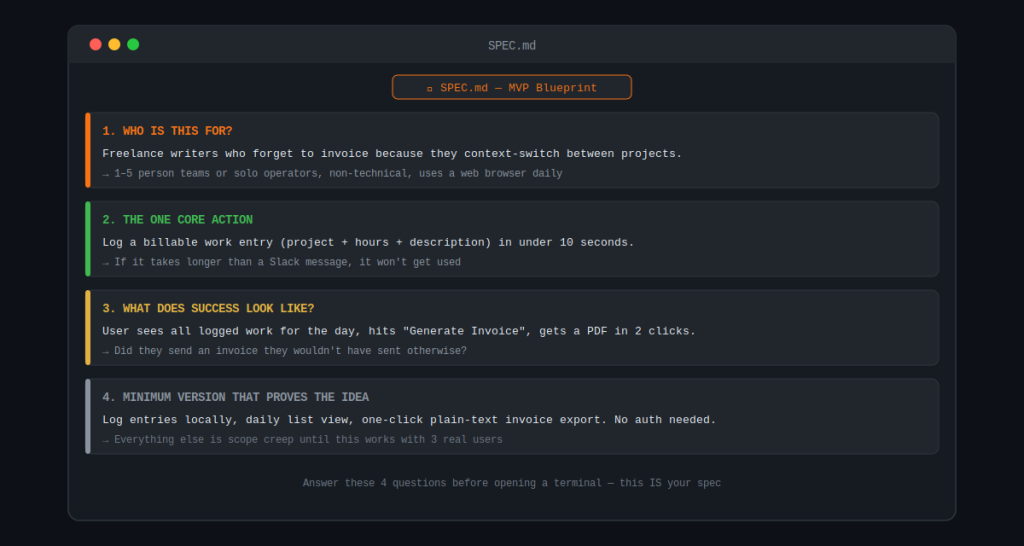
Open a text file and answer these four questions: Who is this for? What is the one thing they need to do? What does success look like after they do it? What’s the simplest version of this that proves the idea works? Your answers to these four questions are your spec. Everything else is scope creep waiting to happen.
Step 2: Write a Claude Code MVP Spec Document
Claude Code performs best when you give it a structured spec file rather than a conversational prompt. There’s a real difference between “build me a web app that tracks billable hours” and handing it a document with defined features, data models, and acceptance criteria. The latter produces significantly better output on the first pass.
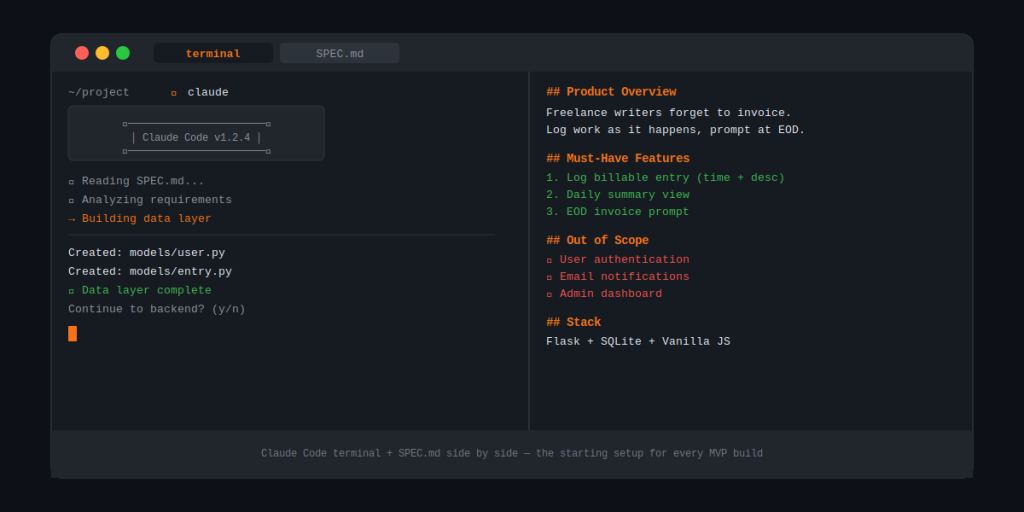
Create a file called SPEC.md in your project folder. Structure it like this:
- Product overview — one paragraph, same as what you wrote in Step 1
- Must-have features — numbered list, maximum 5 items. These are the only things that exist in v1
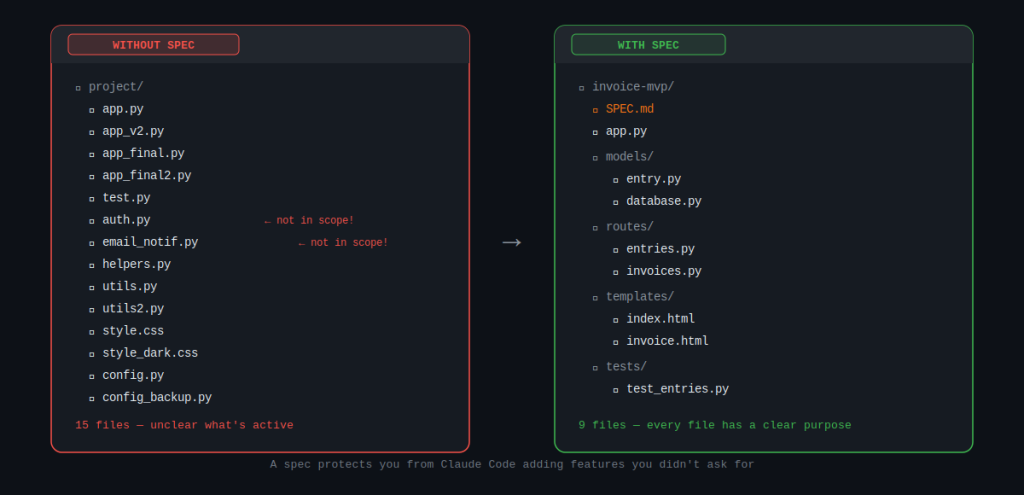
- Out of scope — explicitly list things you’re NOT building. This protects you from scope creep during iteration
- Tech stack preferences — tell it what you want: React + Node, Flask + SQLite, whatever fits your context
- Data model — describe the main objects and their relationships in plain English
Be specific about “out of scope.” If you don’t tell Claude Code what to ignore, it will sometimes add features it thinks are helpful. User authentication, email notifications, admin panels — these are all things that will show up in your MVP if you don’t explicitly exclude them.
Step 3: Run the Initial Build
Navigate to your project directory in the terminal and start a Claude Code session:
cd your-project-folder
claude
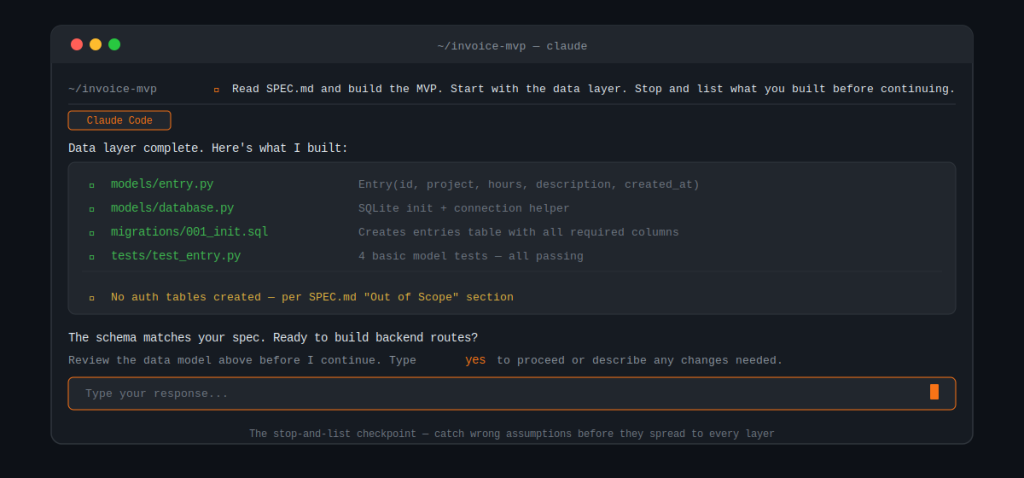
Then give it your first prompt. Don’t just say “build this.” Say: “Read SPEC.md and build the MVP described. Start with the data layer, then the backend routes, then the frontend. After each layer, stop and list what you built before continuing.”
That stop-and-list instruction matters. It gives you checkpoints to review what was built before Claude Code moves on. Catching a wrong assumption at the data layer is a 5-minute fix. Catching it after the frontend is built means rework across every layer.
What to Watch for During the First Pass
Pay attention to the data model it creates. This is where most MVP builds go wrong. If the schema doesn’t match your mental model of how the data should flow, stop and correct it before asking it to proceed. Everything else builds on top of that foundation.
Step 4: Test It Yourself First
Before showing it to anyone, run through the core user flow yourself. Not to evaluate the design or performance. To find the places where it breaks. Claude Code is very good at building the happy path and sometimes less careful about edge cases and error states.
Make a list of everything that breaks or behaves unexpectedly. Then feed that list back to Claude Code in a single prompt: “Here are 6 issues I found during testing. Fix them in this order, and confirm when each one is done before moving to the next.”
Don’t try to fix multiple things in a single vague prompt like “clean up the bugs.” Specific, ordered instructions produce specific, reliable fixes. Vague instructions produce changes that fix one thing and introduce two others.
Step 5: Get It in Front of Real Users
This is the step most solo developers skip because it feels uncomfortable. Don’t skip it. An MVP that no one has used is not an MVP, it’s a side project. The entire point of building the minimum version is to find out whether real people will use it and whether it solves their actual problem.
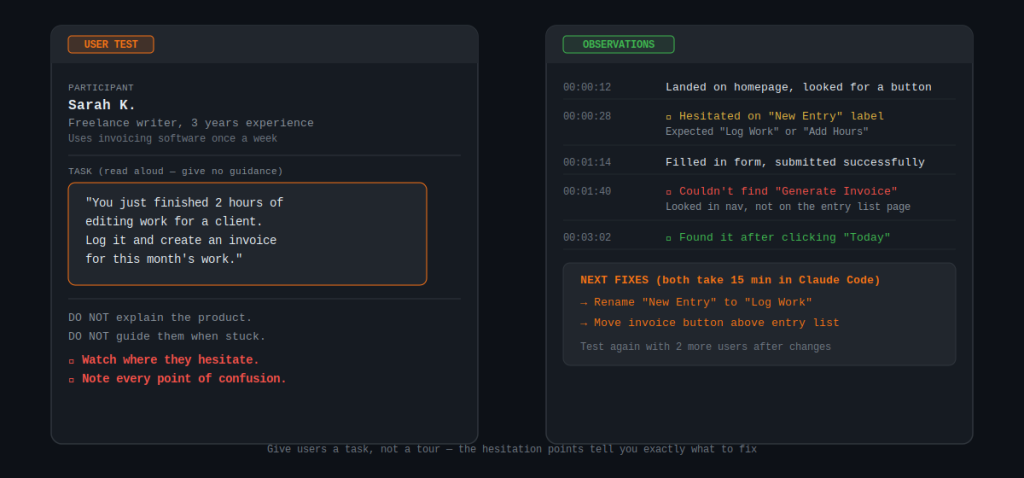
Find three to five people who match your target user profile. Don’t explain the product to them. Give them access and a single task: “Try to accomplish [core action] and tell me where you got confused or stuck.” Watch what they do. Don’t guide them. The places where they hesitate or fail are exactly where you need to iterate next.
Pro Tips
- Give Claude Code context at the start of every session. It doesn’t retain memory between sessions. Start each new session with: “Here’s the current state of the project: [brief summary]. Today we’re working on [specific task].” This prevents it from making changes that conflict with earlier decisions.
- Commit your code after every working feature. Use git. Even if you’re working alone. Claude Code occasionally makes a change that breaks something that was working, and having a clean commit to roll back to saves significant time.
- Ask it to explain the code it writes. If something is unclear, type: “Explain what this function does in plain English.” Understanding the code means you can debug it yourself when something breaks during a user test.
- Use the spec document as a change log. When you decide to add or remove something, update SPEC.md first. Then reference it in your next Claude Code prompt. This keeps the codebase and your intentions aligned.
- Don’t polish before you validate. Resist the urge to spend time on design, performance, or nice-to-have features before you’ve confirmed the core flow works for real users. That time is almost always wasted on MVPs that end up pivoting after feedback.
- When Claude Code produces something you didn’t ask for, delete it explicitly. Tell it: “Remove [feature]. It’s not in scope.” Don’t let unused code accumulate. It creates confusion and makes the codebase harder to reason about.
Common Mistakes to Avoid
- Treating the first build as the final build. Claude Code’s initial output is a starting point, not a finished product. Plan for at least two or three iteration rounds before you show it to users.
- Not writing a spec first. Conversational prompting produces code that works individually but doesn’t hang together well. A spec document forces you to think through the whole system before building any of it.
- Building features before validating the core. If the core flow doesn’t work, no amount of polish or additional features will save the MVP. Get the single most important user action working end-to-end before adding anything else.
- Scope creep disguised as “just one more thing.” Every feature adds complexity. More complexity means slower iteration and more surface area to test. The cost of each feature is much higher than it looks in the moment.
- Skipping error handling because “it’s just an MVP.” If your app crashes on unexpected input, users lose trust immediately. Ask Claude Code to add basic error states for all core user actions. It’s a 10-minute task with disproportionate impact on how serious your product feels.
Next Steps
Once your MVP is working and you’ve collected feedback from at least a few real users, you have a genuine decision to make. Either the feedback confirms there’s something here and you invest more time, or it reveals a problem with the core idea and you need to rethink before building further.
If you’re moving forward, your next priorities are: set up proper version control if you haven’t already, document the known issues so you don’t lose track of them between sessions, and identify the single most important change based on user feedback before starting another build session.
If the feedback was mixed or the core flow didn’t resonate, that’s not a failure. That’s the MVP doing its job. You spent days, not months, finding that out. Go back to Step 1 with what you learned and build a sharper version of the idea.
Either way, the most valuable thing you can do right now is talk to more users. The code will change many times. Understanding your users’ actual problem is the one thing that makes all those future changes go in the right direction.